18 February 2026
Amazon Marketing Cloud (AMC) for Non-Enterprise: Complete Guide
TweetLinkedInShareEmailPrint 8 min read By Rick Wong Updated Feb 18, 2026 TL;DR Is AMC free and availab...

 18 February 2026
It’s a reporting bucket for non-search ads. It includes Rufus AI chat suggestions, Alexa Echo Hub visual ads, and Prime Video “Pause” ads. Basically, ads shown during conversations or streaming, not keyword searches.
Because Amazon’s AI bids aggressively on these slots. It knows users chatting with Rufus or Alexa have high intent to buy immediately. It pays a premium to win that “solution moment.” And yes, this is where most sellers start to panic.
Attribution lag. These ads drive discovery, but customers often buy hours later via a brand search. The “Interactive” ad takes the cost hit; the search ad gets the credit. Check your New-To-Brand (NTB) metrics instead of ROAS to see the true value.
No, you cannot target or exclude it directly. To control costs, pause broad match keywords in high-spend campaigns (these trigger Rufus most often) or use negative phrase matching for support terms like “fix” or “broken.”
It starts with a subtle discrepancy in your weekly audit. You are reviewing your Sponsored Brands placement report, expecting the usual suspects: “Top of Search” driving your efficiency and “Product Page” driving your volume. But then you see it: a line item that didn’t exist two years ago, now silently consuming 18% of your budget with a Cost-Per-Click that makes you want to close your laptop.
It is labeled simply: “Other – Interactive”.
If you are like most of the seven-figure sellers I consult with, your initial reaction to this line item is a mix of confusion and defensiveness. The metrics look wrong. The CPC is often 40% higher than your Top of Search bid. The ROAS fluctuates wildly from 0.5x one week to 8.0x the next. And worst of all, there is no switch to turn it off.
But ignoring this placement is a mistake. “Other – Interactive” is not a reporting glitch or a “garbage bucket” of leftover inventory. It is the financial footprint of Amazon’s shift toward Agentic Commerce. It is the catch-all category for the most advanced, high-tech, and misunderstood ad inventory on the platform: Rufus Chat Ads, Prime Video Contextual Pauses, and Echo Hub Smart Home placements.
In this guide, we are going to tear open the black box. We will define exactly what this placement is, why the algorithm is willing to pay such a premium for it, and how you can audit your account to ensure you aren’t paying a “stupidity tax” on the future of advertising.
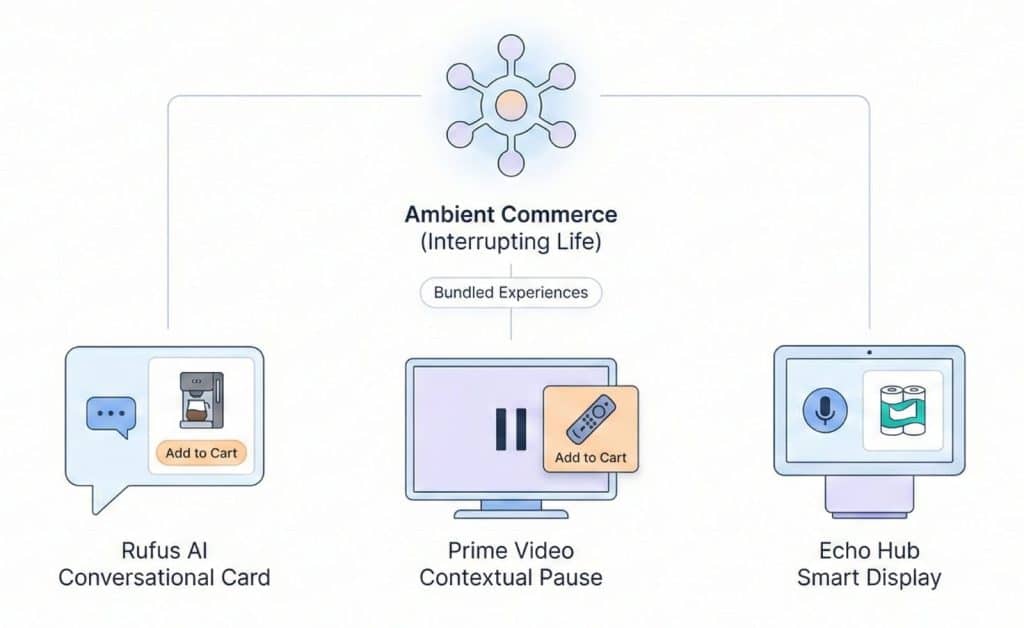
To understand why this placement behaves so erratically, you have to understand that Amazon has effectively bundled three completely different user experiences into one reporting line. This is “Ambient Commerce”, ads that appear while the user is living their life, not just searching for products.
The primary driver of this spend is the Rufus Conversational Card. When a shopper asks Amazon’s AI assistant a question like, “What is a good coffee maker for a small apartment that heats up fast?”, Rufus generates a text answer. But immediately below that answer, it generates a dynamic product card. This isn’t a standard search result; it is a “suggested solution” embedded in the chat. Because the user can interact with this card (tapping to add to cart directly from the chat or asking follow-up questions) Amazon classifies it as “Interactive.”
The second component is the Prime Video Contextual Pause. Since late 2025, Amazon has aggressively rolled out ads that appear on-screen when a viewer pauses a show on Prime Video. If you are running Sponsored Brand Video creatives, your ad can appear here. The viewer can use their Fire TV remote to “Add to Cart” or “Send to Phone” without ever leaving the movie player. It is a high-frictionless transaction, but because it happens off the main search grid, it gets dumped into the “Other” bucket.
The final piece is the Echo Hub Display. With the proliferation of smart home screens in US kitchens, Amazon is serving visual Sponsored Brand ads when users make voice queries. If a user says, “Alexa, I need paper towels,” and your brand appears on their refrigerator screen, that impression is logged here.
When you see that “Other – Interactive” line item, you aren’t paying for keywords. You are paying for the privilege of interrupting a conversation, a movie, or a household chore.
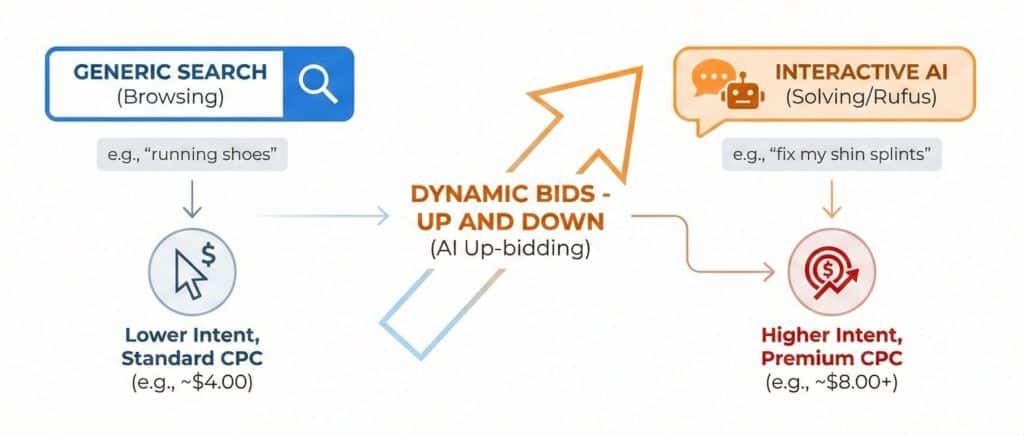
The most common grievance I hear from Brand Managers is the cost. “Why am I paying $6.50 for a click in ‘Other – Interactive’ when my Top of Search bid is only $4.00?”
The answer lies in the fundamental difference between “Browsing” and “Solving.”
In a traditional search environment, a user typing “running shoes” is browsing. They are in the consideration phase, likely to click on five different listings before making a decision. But a user asking Rufus, “I need running shoes that fix my shin splints,” has revealed a specific problem. They are in “Solution Mode.”
Amazon’s bidding algorithm knows this. It assigns a massive “Probability of Conversion” score to these interactive placements because the intent is so much richer. If you have “Dynamic Bids – Up and Down” enabled on your campaign—which, let’s be honest, you do—the algorithm is authorized to raise your bid by up to 100% for placements that are more likely to convert.
Because the AI values the Rufus placement so highly, it aggressively up-bids you to win that specific chat bubble. It is essentially saying, “This user is about to buy; I will spend whatever it takes to get you in front of them.” The result is a $4.00 bid becoming an $8.00 charge. In most cases, the bidding logic is functioning as intended, but it values these placements more than many sellers expect.
If the algorithm is so confident, why does the ROAS often look terrible in the report? This is where the data can be deceptive, leading many sellers to prematurely kill effective campaigns.
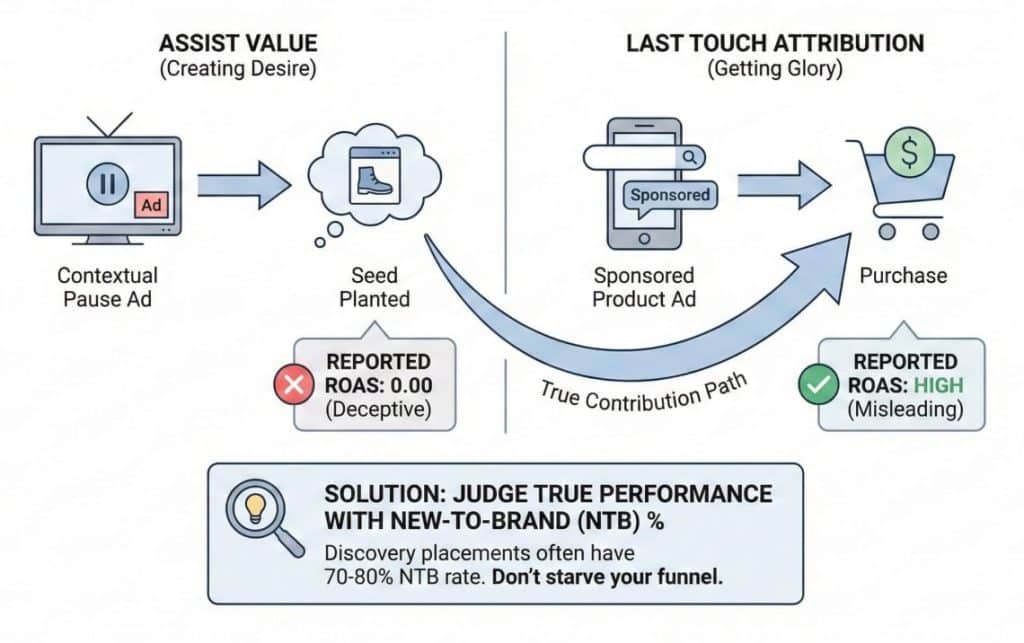
The problem is the conflict between “Assist Value” and “Last Touch Attribution.”
Consider a typical 2026 customer journey. A user is watching The Boys on Prime Video. They pause the show to get a snack. They see your Contextual Pause ad for a spicy popcorn seasoning. They are intrigued, maybe they even click “Send to Phone,” but they go back to watching the show. The seed has been planted.
Three hours later, the show is over. The user opens the Amazon app, types in your brand name, clicks a Sponsored Product ad, and buys the seasoning.
In your reporting dashboard, the Sponsored Product ad gets all the glory: a high ROAS and a cheap conversion. The “Other – Interactive” placement, which did the heavy lifting of creating the desire, gets hit with the cost of the impression but zero sales revenue. It shows a 0.00 ROAS.
To judge the true performance of this placement, you must stop looking at ROAS and start looking at the New-To-Brand (NTB) percentage. In almost every account I audit, the “Other – Interactive” placement has an NTB rate significantly higher than the account average, often hovering around 70% to 80%. This placement behaves more like discovery than retargeting. If you judge it by the same efficiency standards as your Branded Search campaigns, you will cut it off and starve your funnel of new customers.
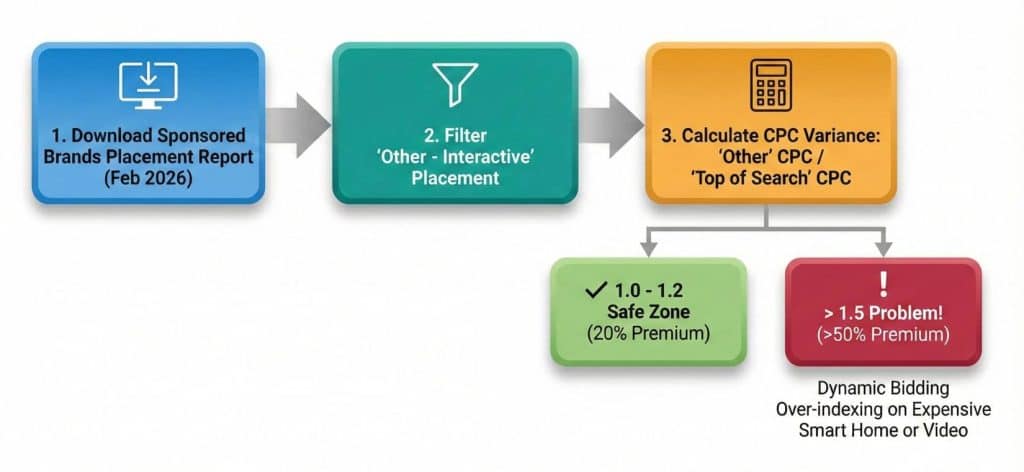
You need to know exactly how much exposure you have right now. As of February 2026, this data is still frustratingly buried in the sub-menus of the Advertising Console.
Start by downloading a Sponsored Brands Placement Report for the last 30 days. Don’t look at the summary screen in the browser; download the actual Excel file. You need to filter the “Placement” column specifically for “Other – Interactive.” In some older API connections or third-party software, this might still be labeled as “Detail Page – Non-standard” or simply “Other,” so look for the line items with abnormally high CPCs.
Once you have isolated this data, calculate your CPC Variance. Divide your “Other – Interactive” CPC by your “Top of Search” CPC. If the result is between 1.0 and 1.2, you are in the safe zone; you are paying a 20% premium for high-intent interactive traffic. However, if the result is higher than 1.5, meaning you are paying 50% more for these clicks than for search clicks, then you have a problem. It means the Dynamic Bidding algorithm is over-indexing on expensive Smart Home or Video impressions that aren’t converting for you.

Since Amazon does not currently give us a simple “Bid Multiplier” for the Interactive placement, we have to use “Exclusion Logic” to manage the spend. We can’t tell Amazon where to show the ad, but we can restrict what triggers it.
The most effective method is Broad Match Containment. The Interactive placement thrives on broad match modifiers because it matches loose, conversational intents. If you see your “Other” spend spiraling, it is likely coming from your Broad Match keywords. The move here is to pause those Broad terms in your main campaign and move them to a separate “Discovery” campaign with a significantly lower base bid. By lowering the base bid, you cap the maximum amount the Dynamic Bidding engine can up-bid for the Rufus placement, effectively putting a ceiling on your CPC.
The second lever is Negative Phrase Firewalls. Rufus triggers ads based on conversational context. You can block the “bad” conversations. Look at your Search Term report for queries that imply troubleshooting rather than buying; words like “fix,” “broken,” “parts,” or “manual.” If a user is asking Rufus how to fix a broken product, and your ad appears, you are paying for a wasted impression. Adding these as Negative Phrase matches prevents your ad from showing up in these “support” chats, ensuring you only pay for “shopping” chats.
Finally, consider the Creative Separation. Since Prime Video Pause Ads are triggered by your Video creatives, you should isolate your Sponsored Brand Video (SBV) campaigns from your Product Collection campaigns. If your SBV campaign has high “Other” spend, it’s undeniably Prime Video inventory. You can then decide to lower the budget for that specific video campaign without hurting the visibility of your Store Spotlight campaigns that run on traditional search results.
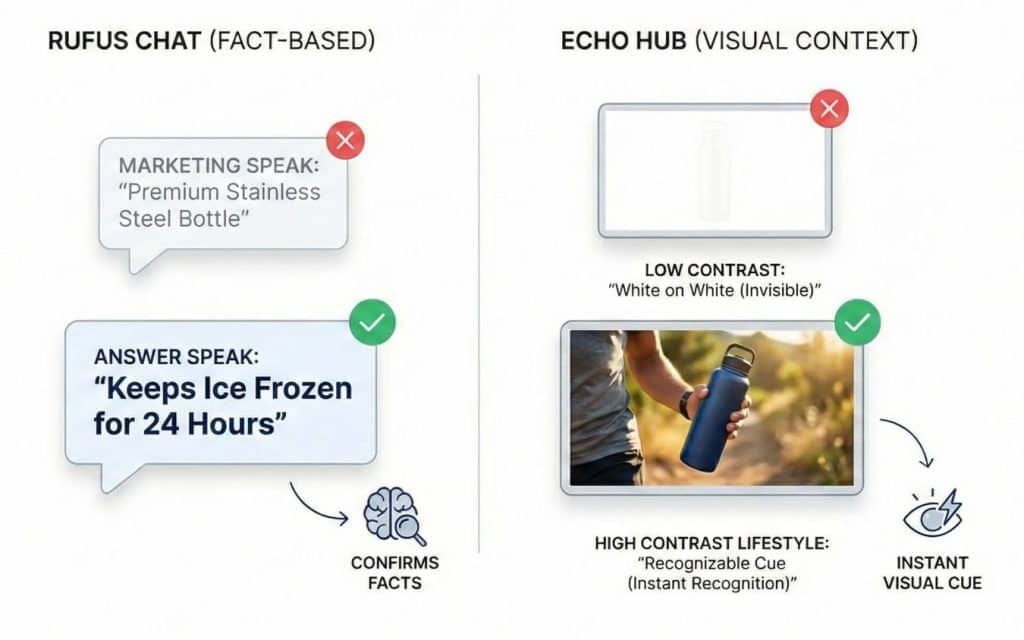
If you are going to pay the premium for these placements, your creative must be adapted for them. A static image of your bottle with a generic logo is invisible in this environment.
In a Rufus chat, users are looking for facts. Your Sponsored Brand headlines need to shift from “Marketing Speak” to “Answer Speak.” Instead of a headline like “Premium Stainless Steel Bottle,” try “Keeps Ice Frozen for 24 Hours.” The latter confirms the specific fact the user might be searching for, validating the AI’s recommendation.
For the visual Echo Hub placements, context is everything. A white product on a white background disappears on a smart screen in a bright kitchen. You need high-contrast lifestyle images that are recognizable from ten feet away. A bottle being held by a runner is a distinct visual cue that registers instantly with a distracted user; a bottle floating in white space does not.
“Other – Interactive” is the most controversial line item in the 2026 ad stack. It reflects how keyword-based advertising is now intersecting with AI-driven placements. Yes, it is expensive. Yes, the attribution is murky. And yes, it feels like Amazon is forcing you to pay for their experiments.
But the reality is that this is where the shoppers are going. Usage of Rufus and Voice Shopping continues to climb. If you aggressively choke off this placement to save a few points of ACOS, you are effectively hiding your brand from the most advanced, high-income shoppers on the platform. The “Other” bucket now includes placements that are becoming more common. It just requires more active oversight than most brands are used to.
It is a reporting category that aggregates non-standard ad placements. The primary components are Rufus AI Chat Ads (suggested products within a chat), Alexa/Echo Hub Display Ads (visual ads on smart screens), and Prime Video Contextual Pause Ads (ads shown when streaming content is paused).
Amazon currently treats these as “extension” placements. They are automatically targeted based on your keyword relevance and bid aggression. You cannot yet set up a campaign specifically to target “Rufus” or “Prime Video Pause” exclusively.
This is due to “Attribution Lag.” Many users interact with these ads for discovery (top of funnel) but purchase later via a different search. The “Interactive” placement gets the cost, but the final search ad often gets the credit, making the Interactive ACOS appear artificially high.
Not explicitly. However, turning off “Dynamic Bids – Up and Down” reduces the likelihood of winning these auctions. These placements usually require a higher bid than standard search slots, so a fixed bid strategy often naturally excludes you from them.
While this reporting line is most prominent in Sponsored Brands, Sponsored Products are also beginning to appear in Rufus chats. In Sponsored Product reports, these often show up under “Rest of Search” or generic “Other” lines, but the distinction is less clear than in SB reports.
Focus on Custom Images and Headlines. Since these ads appear in “conversational” or “ambient” contexts, your visual must clearly communicate the product’s utility without needing a click. A lifestyle image showing the product in use often converts better here than a plain product shot.
Predominantly, yes. Rufus is a mobile-first experience, and Alexa ads are device-specific. However, the desktop integration of Rufus means that some of these impressions are occurring on web browsers, though the volume is lower.
This is due to inventory scarcity. There are only a few “Chat” slots available compared to thousands of “Search” slots. When a high-intent query happens, the auction density is incredibly high, driving up the cost. If search volume for that specific intent drops the next week, the CPC falls.
No. You should trust the New-To-Brand (NTB) metrics. If your NTB% is high on this placement, it is doing its job of bringing in new customers, even if the direct ROAS looks poor.
Industry rumors suggest a “Premium Placement” control is coming in late 2026. For now, Amazon prefers to keep this inventory bundled to ensure high fill rates for its new AI features, so manual control remains limited.
18 February 2026
TweetLinkedInShareEmailPrint 8 min read By Rick Wong Updated Feb 18, 2026 TL;DR Is AMC free and availab...

15 February 2026
TweetLinkedInShareEmailPrint 8 min read By Rick Wong Updated Feb 16, 2026 TL;DR I’m launching a b...

8 February 2026
TweetLinkedInShareEmailPrint 8 min read By Rick Wong Updated Feb 08, 2026 TL;DR Is it profitable to run...