
13 June 2026
Amazon Multi-Touch Attribution: What Sellers Need to Know in 2026
TweetLinkedInShareEmailPrint 8 min read By Rick Wong Updated Jun 13, 2026 TL;DR What is Amazon Multi-To...

 9 March 2026

Sponsored Product campaigns drive the most revenue and secure the highly searched placements. Utilizing Amazon PPC Product Targeting within these specific campaigns gives newly launched items the massive visibility needed to capture initial sales, which directly builds the reviews and ratings required to boost your long-term organic ranking
The advantage is the ability to take sales away from your competitors actively. Amazon PPC Product Targeting places your ad directly on a competitor’s detail page. Because data shows a 30% probability that a customer will switch brands for a more attractive offer, a well-optimized listing with better pricing or reviews can easily steal a competitor’s buyer right before they check out.
While ASIN targeting is highly specific, category-level Amazon PPC Product Targeting is an incredibly powerful tool for product launches and broad brand awareness. It allows you to cast a wide net, ensuring your new listing gains maximum visibility across thousands of related product pages almost instantly.
Unlike traditional keyword search volume, which remains relatively static over time, highly profitable targeting requires you to frequently audit your campaigns to remove outdated competitor listings and discover new ones as sellers come and go (a time-intensive process that top sellers often automate with dedicated PPC management software).
Amazon PPC offers a variety of ad types to help sellers scale, primarily broken down into Sponsored Products (SP), Sponsored Brands (SB), and Sponsored Display (SD) campaigns. Within these formats lies one of the most powerful (often underutilized) strategies available to sellers: Amazon PPC Product Targeting (also known in the industry as Product Attribute Targeting, or PAT).
Unlike traditional keyword campaigns that rely on search terms, product targeting allows you to serve your ads directly on specific competitor ASINs or across entire product categories. While it originally launched as a feature exclusive to Sponsored Products, Amazon has since expanded product targeting capabilities to both Sponsored Brands and Sponsored Display campaigns, making it an essential, multi-format tool for dominating your niche.
Whether you want to launch a new item, steal market share from a higher-priced competitor, or defend your own product detail pages from hijackers, ASIN targeting is highly effective. In this guide, we will break down exactly how Amazon PPC Product Targeting works, explore advanced offensive and defensive strategies, and show you how to set up highly profitable campaigns for your Amazon FBA business.
Sponsored Product ads, or SP ads are the most common type of ad you will see on Amazon search results pages. These are the products that show up at the top of your page with the “Sponsored” symbol (circled).

Sponsored Product ads also appear in the middle of the page at times, but the top of the page is the most desired ad placement. Sponsored Product ads also have one more placement on the product detail page of a product. Specifically the product carousel at the bottom of the page labelled “Sponsored products related to this item.”

Sponsored Products are the type of ad that drive the most revenue for products, especially newly launched ones.
Sellers without an established brand should run SP campaigns, because these ads provide high visibility for your products. The key advantage of SP is the top of search page ad placement, this placement generates the most sales. Rarely do shoppers go to the 2nd page, and most will trust products “sponsored” by Amazon.
In contrast, Sponsored Brands ads are useful for established brands or those with enough products in their catalog to advertise their entire store. This is why we believe Sponsored Products ads are more useful to a new seller. Getting your products to top of search using SP campaigns makes a sale more likely, and once you get sales, you receive reviews & ratings. These then contribute to your products organic ranking.
After you’ve established your footprint, you can start running SB campaigns promoting your entire brand. But note, one thing SB campaigns do NOT provide is product targeting!
Product targeting is an option available in Sponsored Product campaigns at the ad group level. All Amazon Sellers run SP keyword targeting campaigns, but not all run SP product targeting campaigns. So what exactly is product targeting?
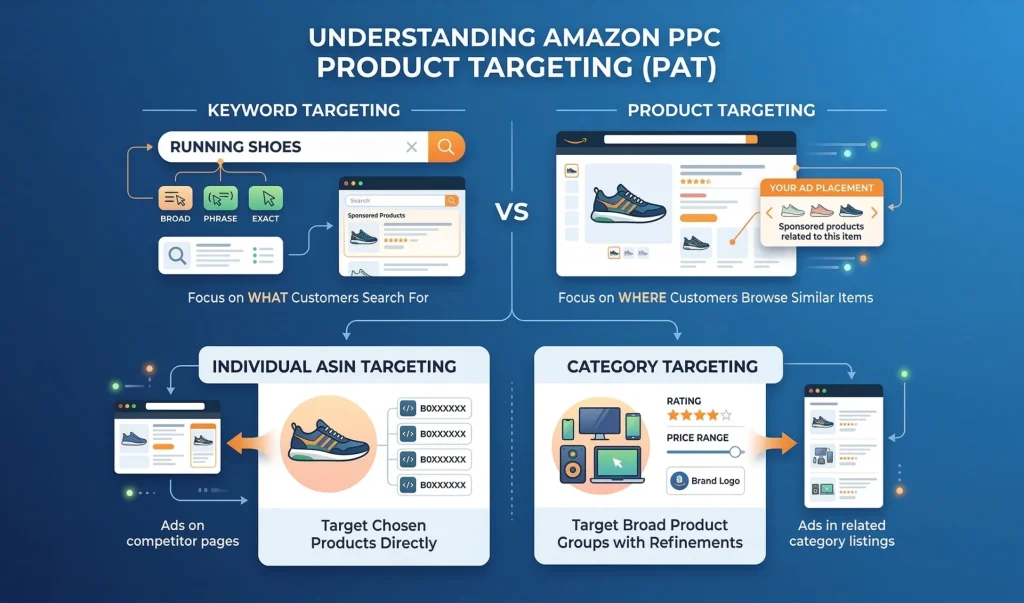
Product targeting lets you target specific products, categories or brands instead of keywords. One example of this is ASIN targeting – you can target any ASIN in your SP ad campaign instead of a keyword. In this case, you will be targeting specific products.
You can also target categories, for example – if you sell sleeping bags you can target the “Sports & Outdoors” category. This means your product will show up on search results and/or product detail pages in that category. For brand targeting, you can target another brand that sells similar products to show up on search results for that brand and even their product detail page to sway consumers and “steal” sales from competitors.
You can also target product ‘features.’ For example, you can target a certain price range, or variation of a similar product.
Important note- “Product targeting” does not have it’s own ad placement! Your ad can show up on a competitor’s detail page, but that doesn’t mean it’s another type of ad. It’s still a sponsored product ad placement, but you are just targeting a product instead of a keyword at the ad group level.
Amazon offers two primary levers to pull within PAT campaigns: targeting specific individual products (ASINs) or targeting broader product categories. Knowing when to deploy each is the secret to scaling your ad revenue efficiently.
Category targeting allows you to cast a wide net. Instead of cherry-picking individual products, you tell Amazon to show your ad across a broader subset of items—for example, all products within the “Women’s Running Shoes” category. Because of its broad nature, category targeting typically yields a higher ACOS (Advertising Cost of Sales). However, it is an incredibly powerful tool for product launches and brand awareness. When you introduce a new product to the market, category targeting gets your listing maximum visibility across thousands of related pages. Furthermore, Amazon allows you to refine category targeting by brand, price range, and star rating, allowing you to filter out irrelevant traffic while still maintaining high volume.
If category targeting is a net, ASIN targeting is a spear. You use this when you have a mature product and a deep understanding of exactly who your competitors are. ASIN targeting should be utilized when you want to disrupt a specific competitor who is already dominating the market, or when you know which specific products are commonly bought as alternatives to your own. Because you are hand-selecting the exact pages your ads will appear on, ASIN targeting generally results in higher conversion rates and a more manageable ACOS compared to category targeting.
So why use product targeting? Why should you put your daily budget dollars into anything other than the traditional keyword targeting?
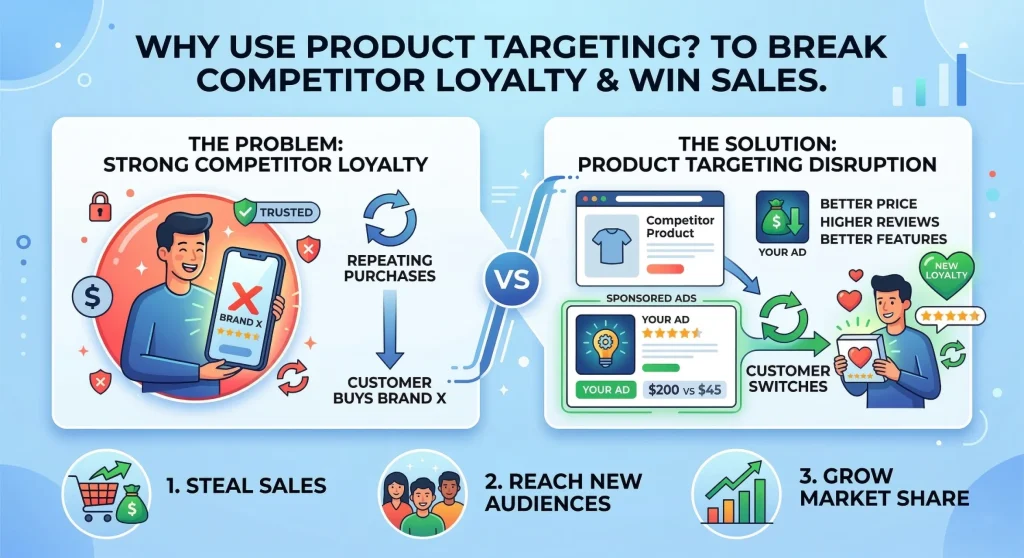
Take sales from your competitors! This is the premier advantage of ASIN targeting, specifically. You can use a web scraping tool to get a list of competitor ASINs for your most high-performing keywords. After that, you can refine them by relevancy and add all those competitor ASINs into an ad group in an SP campaign that is using product targeting.
This campaign will place YOUR product on the detail pages of your competitors ASINs. If your product is cheaper, has more reviews, and is generally more attractive, it will catch the eye of a consumer who was about to buy that competitor product. You can essentially steal that sale from your competitor!
Of course, it’s not guaranteed to work, but if you optimize your listing and make it attractive enough, it will yield results during ASIN targeting. According to Amazon, you cannot depend on brand loyalty. There’s a 30% probability an Amazon customer will switch to another brand if the product is more attractive. This is good news for those who use ASIN targeting campaigns, because this means customers are likely to swap to YOUR product, if they see it on your competitor’s detail page and find it more attractive.
When most sellers launch a Product Attribute Targeting (PAT) campaign, their immediate instinct is to go on the attack. While capturing market share from competitors is a fantastic use of your ad spend, a well-rounded Amazon PPC strategy requires a balance of both offensive and defensive tactics.
Offensive product targeting is all about leveraging your competitor’s traffic to drive sales for your own brand. However, you shouldn’t just target any related product blindly; you need to act like a sniper. Look for competitor ASINs where your product has a clear, undeniable advantage.
If you are running offensive campaigns against your competitors, you better believe they are doing the exact same thing to you. Defensive product targeting involves bidding on your own ASINs to protect your real estate. By running Sponsored Product and Sponsored Display ads targeting your own catalog, you monopolize the ad placements on your own product detail pages. This prevents competitors from showing up and stealing your hard-earned traffic. Furthermore, defensive targeting is the ultimate cross-selling tool. If a shopper is looking at your top-selling facial cleanser, use product targeting to display your daily moisturizer right below it. You effectively turn a single purchase into a basket-building opportunity.
While scraping tools are great for initial research, the absolute best data comes directly from your own historical performance. Your Amazon Search Term Report is a goldmine for discovering new ASINs to target.
If you are running Automatic Campaigns, Amazon is already doing the heavy lifting by testing your product against various search terms and competitor listings. To harvest this data, download your Search Term Report and look at the “Customer Search Term” column. Filter this column to only show terms that begin with “b0” (the standard prefix for all Amazon ASINs).
This will instantly generate a list of every competitor ASIN that your automatic campaign has successfully converted against. Take these proven, high-converting ASINs, pull them out of the automatic campaign, and place them into a manual ASIN targeting campaign with a higher, more aggressive bid.
Setting up an ASIN targeting campaign is quite easy. You just do the regular steps of setting up a campaign, but when it comes to adding ad groups, you select product targeting instead of keyword targeting.
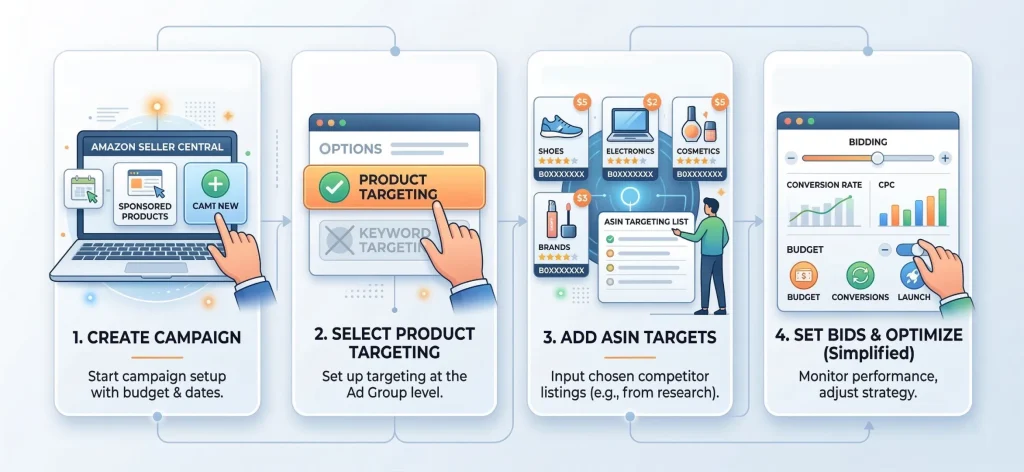
Carefully research your competitors, you can use reverse ASIN lookup tools or you can use a web scraper tool to compile a list of ASINs that show up for a particular search term. We recommend doing this for your top 5 keywords, and compiling the list of competitors together. There will of course be duplicates, so put that list into an excel file, remove duplicates and then filter out your own ASINs because you don’t want to be targeting those.
You can further go through the list manually to remove any irrelevant competitor products. After you have this list, simply input it into the product targeting field in your ad campaign.
As there is no historical CPC data for ASINs like there is for keywords, you can start off running an automatic SP product targeting campaign. Or you can set a default bid that you check frequently and update. Once you start getting some conversions, you can optimize these bids further, but this is of course time intensive.
When it comes to targeting products and ASINs in ad campaigns, it is harder to decide how much to bid, when to update your bids, and how frequently. Not only that, unlike keyword targeting where most relevant keywords will remain the same over time… Competitors come and go, so every so often you need to find new ASINs to target, and remove old ones. Like we mentioned in the previous section this is a time-consuming process… which is why Amazon Sellers use Amazon PPC Management Software like ours.
Amazon PPC tools and Amazon PPC Software can cut your work in half. You can automate bids, set rules and research your competitors deeply to refine your ASIN targets. We recommend using PPC tools like our own if you are new to product targeting campaigns.
Just as negative keywords are essential for traditional search campaigns, Negative Product Targeting is the key to preventing wasted ad spend in your PAT campaigns.
In advertising, association is everything. There will be certain brands, product types, or price brackets that you simply do not want your brand associated with. If you sell a premium, luxury leather good, you do not want your ad appearing on the detail page of a cheap, mass-market synthetic alternative. The shoppers on that page are looking for a bargain, and your premium price tag will only result in wasted clicks and zero conversions.
By adding these specific ASINs or low-tier brands to your negative targeting list, you explicitly tell Amazon not to show your ads on those pages. Routinely auditing your campaigns and adding poorly converting competitor ASINs to your negative list will drastically improve your click-through rates (CTR) and safeguard your profit margins.
To sum up, we highly recommend Amazon Sellers to use SP product targeting campaigns! These serve as a very good “backup” to your keyword targeting campaigns, and can get you very good conversions if properly optimized. We hope our guide helped you understand how product and ASIN targeting work, and how you can implement it for your own Amazon stores!
About the author: Rick Wong is a Senior Amazon PPC Strategist at SellerMetrics with seven years of experience managing Amazon advertising campaigns across CPG, electronics, and home goods categories. He has overseen more than $50M in cumulative Amazon ad spend and specializes in Sponsored Brands and DSP strategy for mid-market brands scaling on Amazon.
Amazon PPC product targeting (also known as Product Attribute Targeting or PAT) is an advertising feature that allows sellers to bid on specific competitor ASINs, entire categories, or specific product features (like price or star rating) rather than bidding on traditional keyword search terms.
No. While product targeting is highly popular in Sponsored Products campaigns, Amazon has expanded this feature. Advertisers can now utilize this targeting strategy within Sponsored Brands and Sponsored Display campaigns to maximize their reach across the platform.
Within Amazon PPC product targeting, ASIN targeting allows you to place your ads on the exact product detail pages of specific, hand-picked competitor products. Category targeting allows you to cast a wider net by displaying your ads across a broad group of related products within a specific Amazon category.
The most profitable strategy is to target competitor ASINs where your product has a clear advantage. Look for competitor products that are priced higher than yours, have lower star ratings, or feature fewer reviews. You can find these ASINs by auditing the Search Term Reports from your auto-campaigns.
Negative product targeting allows you to block your PPC ads from appearing on specific competitor product pages or within certain brands. This is a crucial optimization step that prevents wasted ad spend on detail pages that yield a low conversion rate for your product.
Yes. Targeting your own catalog with Amazon PPC is known as “Brand Defense.” By placing your own ads on your own product detail pages, you prevent competitors from stealing your traffic and create excellent opportunities to cross-sell your other products.
Depending on the ad type (Sponsored Products, Brands, or Display), product targeting ads can appear in search results, directly on competitor product detail pages (often under “Sponsored products related to this item”), on customer review pages, and even on the Amazon front page.
No. Amazon does not allow you to mix traditional keyword targeting and product targeting within the exact same ad group. You must create separate ad groups for your keyword targets and your product targets, even if they live within the same broader campaign.
Because there is no historical CPC (Cost Per Click) data for ASINs like there is for keywords, it is best to start with a default bid that aligns with your campaign’s daily budget. Monitor the campaign closely and aggressively increase bids on ASINs that convert, while lowering bids on those that do not.
The most effective way to find new ASIN targets is to run an Automatic Campaign and download your Search Term Report. Filter the search terms for queries starting with “b0” to reveal the exact competitor ASINs that are already successfully driving conversions for your product.
13 June 2026
TweetLinkedInShareEmailPrint 8 min read By Rick Wong Updated Jun 13, 2026 TL;DR What is Amazon Multi-To...

12 June 2026
TweetLinkedInShareEmailPrint 8 min read By Rick Wong Updated Jun 13, 2026 TL;DR What is Alexa for Shopp...

8 June 2026
TweetLinkedInShareEmailPrint 14 min read By Rick Wong Updated Jun 08, 2026 TL;DR How should I structure...