
13 June 2026
Amazon Multi-Touch Attribution: What Sellers Need to Know in 2026
TweetLinkedInShareEmailPrint 8 min read By Rick Wong Updated Jun 13, 2026 TL;DR What is Amazon Multi-To...

 8 June 2026

Never mix broad keywords, exact match keywords, and ASIN targets together. Build distinct campaigns for each targeting type and group them into a dedicated Portfolio with a hard budget cap to prevent accidental overspending.
Do not touch your bids for the first 72 hours. The Amazon algorithm requires this initial window to gauge the relevance of your video against search terms. After three days, pull a search term report and immediately negate any irrelevant traffic.
You must use a formatted visual hook, and demonstrate the product solving a specific problem. Shoppers scroll quickly; if you spend the opening frames on slow, generic lifestyle branding, you will lose the attention.
Your file must be an MP4 or MOV under 500MB, filmed in a 16:9 aspect ratio (horizontal). A 1920 x 1080px (1080p) resolution is highly recommended. Always use closed captions, as the video will auto-play on mute.
Sponsored Brands Video (SBV) is one of the highest-converting ad formats available to Amazon sellers today. In 2026, it has become even more powerful: the same video creative that wins keyword search placement now surfaces inside Amazon’s AI shopping assistant (Alexa for Shopping, formerly Rufus), giving brands a second discovery channel from a single production investment.
But the format is not plug-and-play. Amazon’s creative review rejects ads that do not meet spec, captions are functionally required since most viewers watch with sound off, the first three seconds determine whether the viewer scrolls past, and bidding has grown 20–40% more competitive as AI-driven inventory expanded.
This guide is the exact playbook we use at SellerMetrics. It covers everything from video specs and campaign setup to 2026-specific strategy around Rufus, the SBV vs. SPV distinction, and optimizing your first 72 hours live.
Amazon Sponsored Brands Video (SBV) is a search-result ad format that auto-plays a 15–30 second horizontal video at or near the top of Amazon search results when a shopper searches for a relevant keyword. When clicked, it sends the shopper directly to a product detail page or Amazon Store.
In 2026, SBV inventory became eligible for Alexa for Shopping placements (Amazon’s AI shopping assistant, rebranded from Rufus in May 2026). When shoppers ask Alexa for Shopping for product recommendations, SBV creative can now surface alongside organic listings. Sponsored Brand Prompts moved from free beta to billable general availability in the US on March 25, 2026, operating on the same cost-per-click model as standard SBV. This is not a separate campaign you build (your existing targeting and listing quality determine eligibility) but it meaningfully expands the reach of every video you produce.
The practical implication: optimize your product listing copy for natural, intent-aligned language (how shoppers actually describe problems, not just how they keyword-search), because listing quality now determines AI placement eligibility in addition to search ranking.
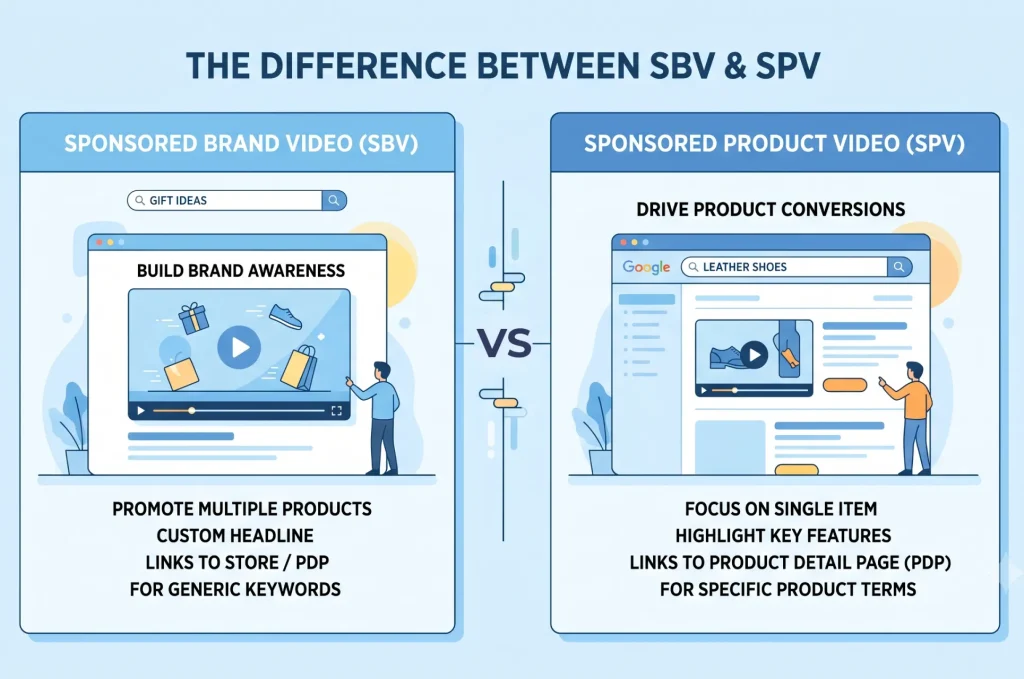
Before you start building, it is critical to understand that there are now two distinct Amazon video ad formats, and they serve different purposes:
If you are not yet Brand Registered, SPV is your entry point into video advertising. If you are Brand Registered, both formats are worth running simultaneously with different creative and targeting strategies. They are complements, not substitutes.
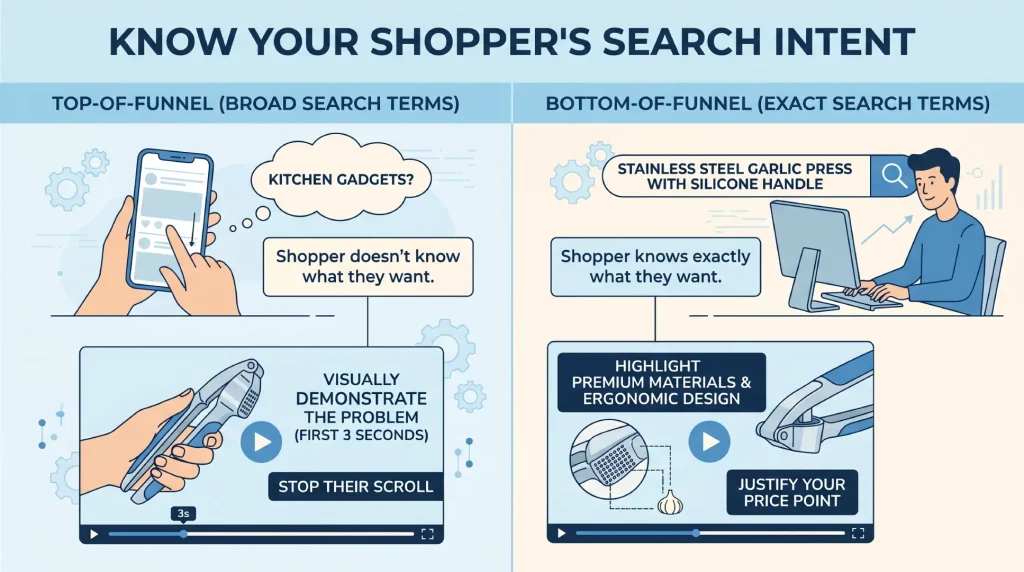
Before you storyboard a single frame, you must align your creative with where the shopper sits in the buying funnel. Amazon shoppers are not passively browsing like they do on social media, they are actively looking to make a purchase. Generic demographic questions like “What is their age?” matter far less than understanding where they are in the decision process.
The rule of thumb: match your video’s opening message to the specificity of the keyword triggering it. This is why you should never run broad and exact match keywords in the same campaign — your creative strategy for each is fundamentally different.
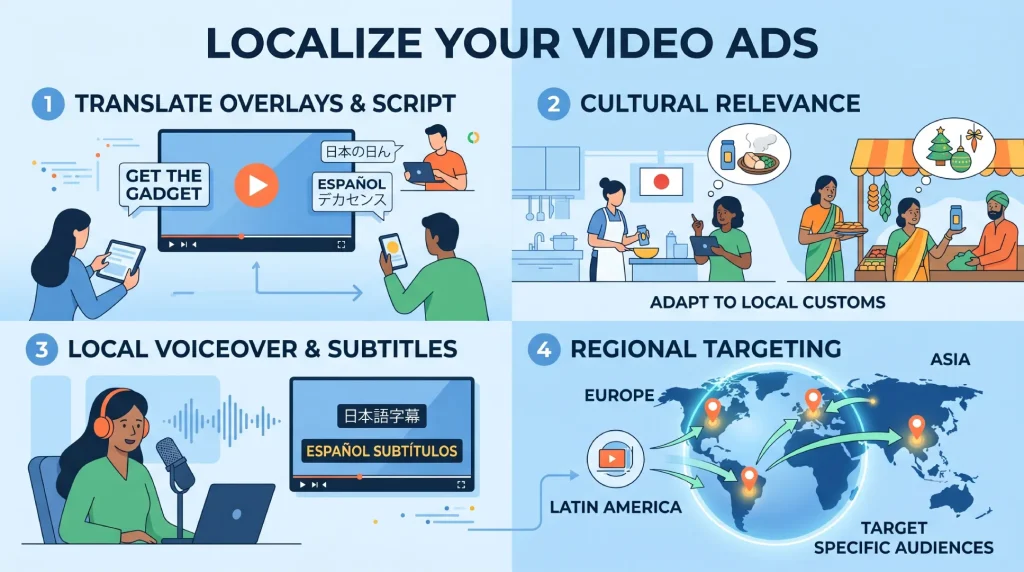
If you sell in multiple Amazon marketplaces, localization is worth the investment. But do it strategically, not as an afterthought.
Four localization priorities:
Before creating ads for a new market, check whether your brand name, tagline, or any product claims carry unintended meanings in the local language. A quick search for your brand name in the target language takes five minutes and can prevent a rejection or, worse, a viral mockery moment.
When you launch a new video campaign on Amazon, you are committing real capital. A poorly structured campaign can drain a weekly budget in hours with zero return. Here is the exact, defensive setup process we use at SellerMetrics.
Amazon’s review team will reject your ad if it fails to meet any of the following. Double-check before uploading to avoid losing 24–72 hours of review time.
Amazon SBV Technical Specifications (2026):
| Specification | Requirement |
|---|---|
| File format | .MP4 or .MOV |
| Video duration | 6–45 seconds (15–30 seconds strongly recommended; 15 seconds is the proven sweet spot) |
| File size | Less than 500MB |
| Video dimensions | 1920 x 1080px, 1280 x 720px or 3840 x 2160px (4k) |
| Aspect ratio | 16:9 (horizontal only, see note on vertical below) |
| Video codec | H.264 or H.265 |
| Video profile | Main or Baseline |
| Frame rate | 23.976fps, 24fps, 25fps, 29.97fps, 29.98fps, or 30fps |
| Video bit rate | Minimum 1 Mbps |
| Video scan type | Progressive |
| Audio codec | PCM, AAC, or MP3 |
| Audio format | Stereo or mono |
| Audio bit rate | Minimum 96 kbps |
| Audio sample rate | Minimum 44.1khz |
| Letterboxing or pillarboxing | Videos must not have black bars on any side of the video content |
| Blank/black frames | Not permitted at the start or end |
2026 note on vertical video: Amazon is piloting 9:16 vertical video support for mobile-specific placements. This spec is not yet broadly available in the standard SBV campaign builder, but if you produce your video content in a square or vertical format for other channels, flag this with your video editor, a vertical cut may become a useful asset later in 2026.
Beyond the technical specs, your video must be engineered for the Amazon shopping experience:
Before you upload anything, build your organizational foundation. When you are managing multiple campaigns across products, losing track of what is running is a budget killer.
In your Amazon Advertising Console, create a dedicated Portfolio for your SBV campaigns and set a hard portfolio-level budget cap. This is your financial safety net; it prevents any single video campaign from consuming your entire advertising budget during the learning phase.
Use a standardized naming convention so you know what any campaign does at a glance:
Formula: [Product Name] – [Targeting Type] – [Match Type] – [SBV]
Example: Garlic Press – Competitor ASINs – Product Targeting – SBV
This makes filtering, reporting, and troubleshooting dramatically faster at scale.
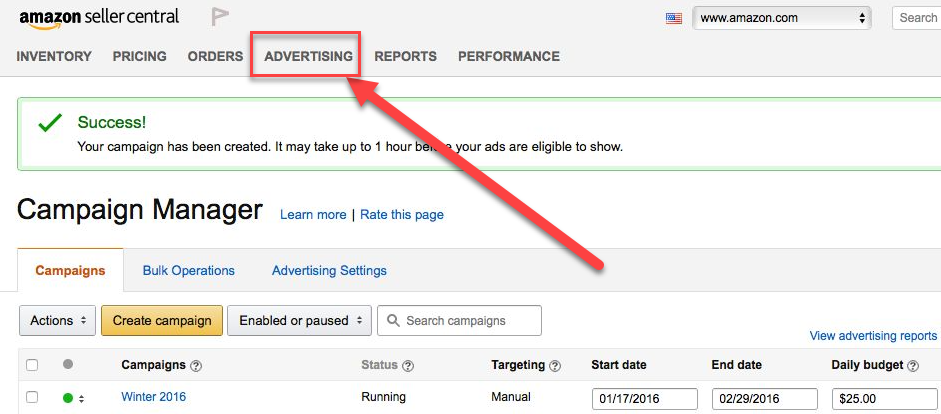
From Seller Central, navigate to Advertising → Campaign Manager → Create Campaign and select Sponsored Brands.
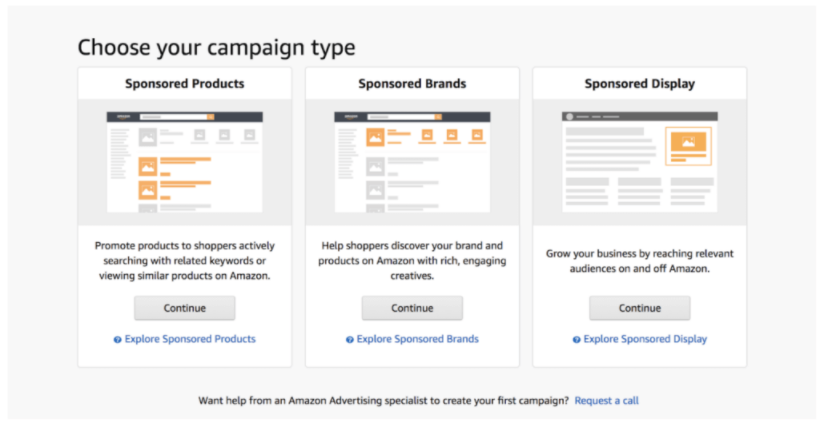
After that, on the format screen, choose the Video option.
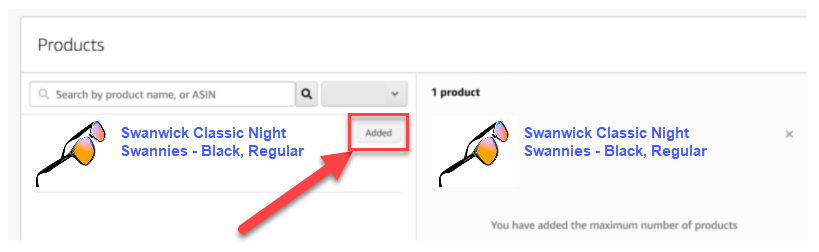
Next, locate the product you’re creating an ad for by selecting it from the “New Product List Page.”
Afterward, click “Add” to upload your video file.
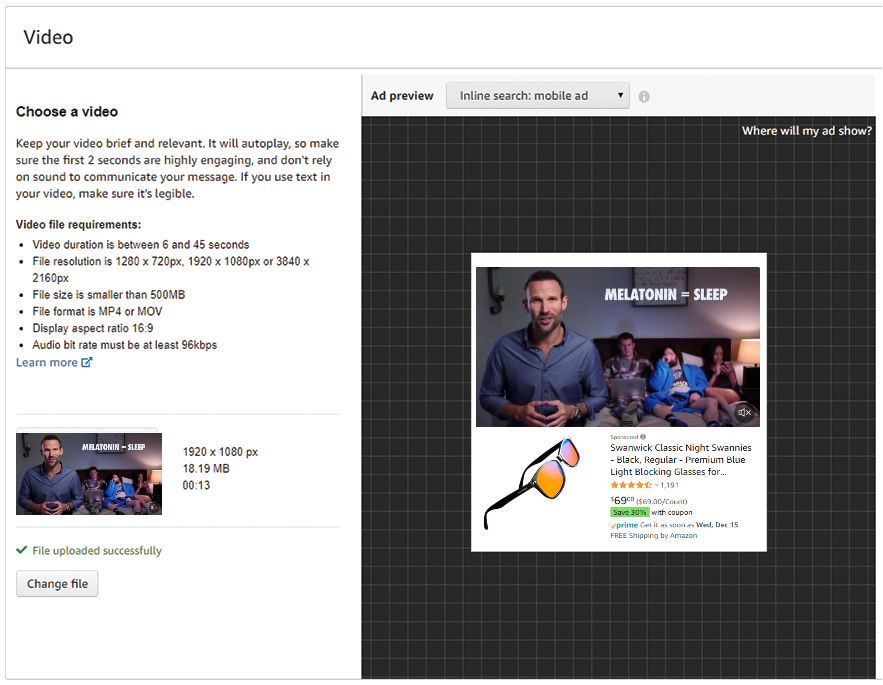
Amazon provides an inline preview panel so you can see exactly how the ad will render before submission.
Note: Amazon manually reviews every SBV submission. Do not assume your campaign will go live immediately after upload.
This is where most sellers make a costly structural mistake. Do not mix broad keywords, exact match keywords, and ASIN targeting in the same campaign. Mixing targeting types makes it impossible to know which specific input is driving sales or wasting spend.
Build three separate campaigns:
Campaign A (ASIN / Product Targeting):
Utilize Amazon PPC product targeting to place your video ad directly on competitor product detail pages. This is a high-intent placement, shoppers are already looking at the category.
Campaign B (Exact Match Keywords):
Use 5–10 exact match keywords with a proven conversion track record from your existing Sponsored Products campaigns. Exact match gives you clean data. When a sale comes in, you know precisely which search term triggered it.
Campaign C (Broad or Phrase Match (optional, with a tighter budget)):
Use this for discovery only. If you run broad match, monitor the search term report aggressively, broad match in SBV is the fastest route to irrelevant traffic and wasted spend, because video clicks carry a premium cost per click.
By isolating targeting types, you can scale what works and kill what does not with confidence.
Video ads typically generate higher click-through rates than standard Sponsored Products, which means your budget can be consumed significantly faster. Start conservatively:
Opening bids: Start 10–15% below Amazon’s suggested bid range, not at or above it. Incrementally raise bids every 48 hours until you begin winning impressions. Bidding high from day one means you are paying a premium CPC while your video’s conversion rate is still unknown.
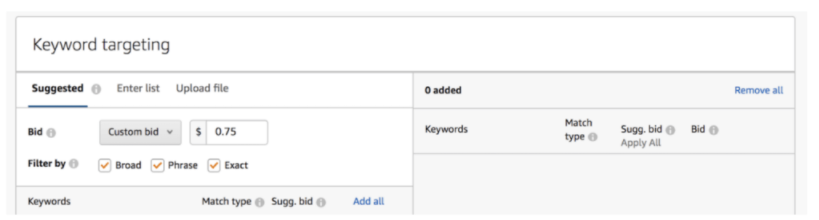
And the final step is to submit your ad for review from Amazon. Amazon will approve or deny your video in ten minutes to a few hours.
If they support your ad, congratulations! However, if they reject your video ad, you’ll need to move on to the next section.
2026 bid context: SBV bidding has become 20–40% more competitive over the past 12 months as Alexa for Shopping expanded inventory demand. Budget floors that felt generous in 2024 may generate very limited impression share in 2026 in competitive categories. Watch your impression share in the first 72 hours. If it is near zero, your bid, not your creative, is the likely bottleneck.
Once you click submit, Amazon’s moderation team begins review. Current approval timeline: 24–72 hours for first submissions. Resubmissions after a rejection can take 3–5 business days, as the team verifies the prior rejection reason has been addressed. Plan for at least one rejection cycle in your launch timeline. First submissions are approved on the first attempt roughly half the time.
Once your campaign goes live, follow this discipline:
After 7 days: Evaluate CTR and view-through rate by targeting type. Scale the campaign generating the strongest ROAS; pause the weakest performers.
Amazon rejects SBV ads more frequently than standard Sponsored Products campaigns because the review process includes additional policy checks around claims, functionality references, and branding presentation. Knowing the common rejection reasons lets you pre-flight your creative before it ever enters the review queue.
Your video should do all three. Lead with what the product does (demonstrate), explain why it matters (inform), and give the viewer a reason to trust your brand (educate). A video that purely pitches pricing or promotions will be rejected. Keep your brand as the focal point and highlight the product’s most compelling features with context, not just visuals.
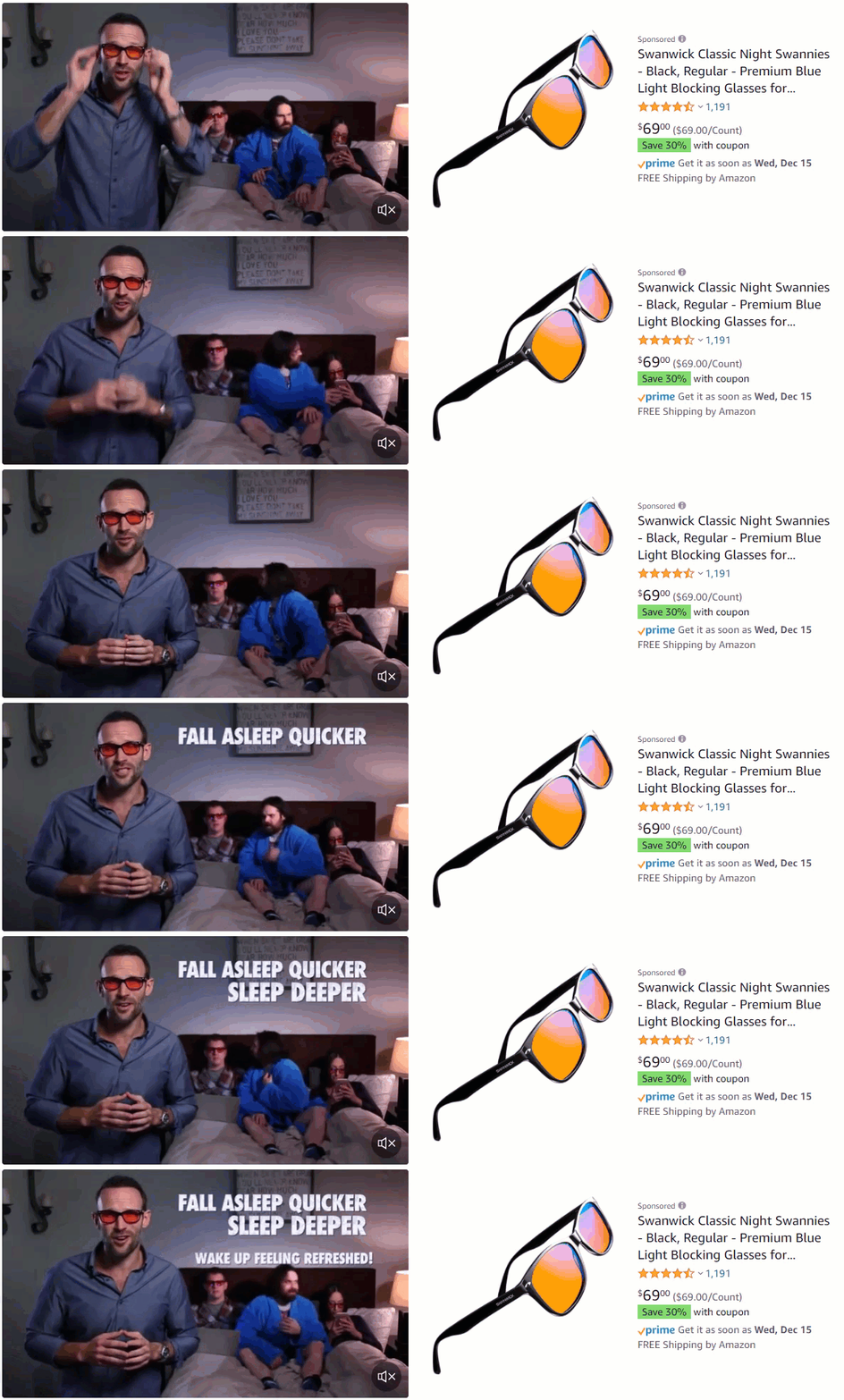
Your customers want to feel like they’re getting an interesting, valuable story in their sponsored brand videos.
If your video feels commercial or like a sales pitch, Amazon may not approve it. Ensure that all product demonstrations are helpful and easy to follow.
Finally, make sure that you’re not trying to sell or promote products in a way that Amazon disapproves of.
Creating an Amazon Sponsored Brand Video campaign can seem daunting at first, but you can do it! Follow this Amazon Sponsored Brands Video campaign tutorial to make the process simple.
When you violate any of Amazon’s advertising policies, it can result in ad rejection.
Make the necessary changes and upload the corrected version for approval if this happens. Amazon is usually quick to approve ads that follow their guidelines.
But don’t worry if you can’t figure out exactly what’s wrong with your video.
Amazon will explain precisely why they’re not approving your ad so that you can correct it quickly! And if you want to guarantee your videos meet quality standards, here are a few tips that’ll help!
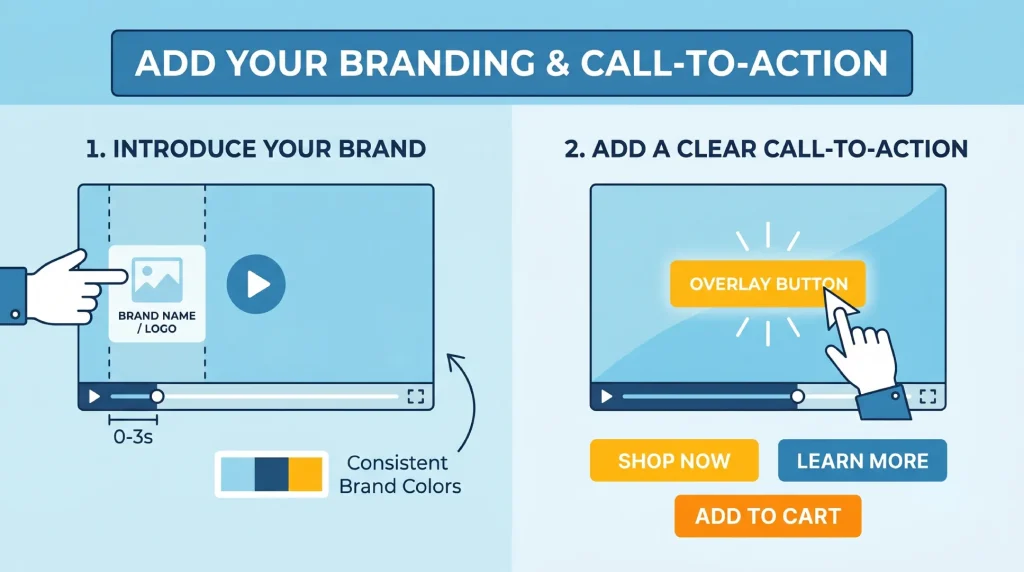
In Amazon Video Ads, you can overlay text and branding elements throughout the video. Introduce your brand logo or name in the first 3 seconds alongside the product, not as a standalone opening frame. Keep brand elements consistent with your Amazon Store and product imagery for visual continuity.
End every video with a clear, specific CTA. Strong options:
Avoid vague CTAs like “Learn More” — Amazon shoppers are in purchase mode, not research mode.

Because SBV auto-plays on mute, closed captions are not a courtesy, they are a core part of your ad’s communication strategy. Industry data shows 60–70% of Amazon shoppers view video ads with sound off, the majority on mobile devices. Follow these captioning standards:
Scaling your brand on Amazon in 2026 means capturing shopper attention faster and more effectively than your competitors at the search result level and increasingly at the AI assistant level. Sponsored Brand Video gives you exactly that advantage, provided you build it on a solid foundation.
The sellers who win with SBV in 2026 share three habits:
They also stay ahead of the format’s evolution. The Alexa for Shopping integration is early-stage; the brands building strong SBV creative libraries today are positioning themselves for an AI-driven discovery channel that will become significantly more competitive over the next 12 months.
Managing granular video campaigns, monitoring bids, and staying current with Amazon’s evolving ad policies is a significant operational commitment. At SellerMetrics, our Amazon PPC software helps sellers, brands, and agencies manage this complexity through advanced bid automation, bulk bid changes, and campaign-level analytics — so you can focus on creative strategy while we handle the operational layer.
About the author: Rick Wong is a Senior Amazon PPC Strategist at SellerMetrics with seven years of experience managing Amazon advertising campaigns across CPG, electronics, and home goods categories. He has overseen more than $50M in cumulative Amazon ad spend and specializes in Sponsored Brands and DSP strategy for mid-market brands scaling on Amazon.
Yes. SBV is restricted to Brand Registry sellers. To access the campaign builder, your brand must be enrolled in Amazon Brand Registry, which requires a registered or pending trademark from a supported IP office associated with your seller account. If you are not yet Brand Registered, you can still run video ads through Sponsored Products Video (SPV), which is available to all sellers without Brand Registry.
Sponsored Brands Video (SBV) requires Brand Registry, appears as a large banner placement at or near the top of search results, and can link to a product detail page or your Amazon Store. Sponsored Products Video (SPV) does not require Brand Registry, appears inline within the standard search result grid, and links directly to a single product detail page. Both formats operate on a CPC model. SBV is stronger for brand consideration and discovery; SPV is stronger for direct, bottom-of-funnel conversion.
Yes, as of 2026, SBV creative is eligible to surface within Alexa for Shopping (formerly Rufus) responses. Sponsored Brand Prompts became generally available in the US on March 25, 2026. The best way to improve your chances of appearing in AI recommendations is to write your product listings in natural, intent-aligned language (the way shoppers actually describe problems) and to maintain strong ratings and listing completeness.
No, video ads auto-play on mute. Shoppers must tap or click the unmute button in the corner of the video to hear the audio. This is why on-screen text and captions are important.
No. Amazon strictly prohibits including customer reviews, star ratings, or any “best seller” claims within SBV video content. This is one of the most common rejection reasons. Do not include screenshots of reviews, aggregated star rating graphics, or statements like “#1 Best Seller in Kitchen”.
They operate on a cost-per-click (CPC) model, meaning you only pay when a shopper clicks your ad. The exact cost depends on your bid, your niche, and keyword competition.
Amazon permits videos anywhere between 6 and 45 seconds. However, the optimal length to maintain shopper retention and maximize the View-Through Rate (VTR) is between 15 and 30 seconds. Because these videos auto-loop automatically on the search results page, keeping the edit tight and completely focused on the benefits prevents the viewer from losing interest.
High impressions with low CTR indicate the mismatch in shopper’s search intent. If the hook and the content isn’t the exact keyword the shopper typed in, they will ignore it. Additionally, if you are running broad match targeting, Amazon may be displaying your video on irrelevant search pages where shoppers have zero intent.
Yes. Product Targeting (ASIN targeting) within SBV campaigns lets your video ad appear on a competitor’s product detail page. This is one of the highest-intent placements available. Run ASIN targeting as a separate campaign to keep your data clean and your bids competitive.
While the platform allows it, using broad match for video ads is a fast way to drain your daily budget. Video clicks are a premium interaction. If you use broad match, the algorithm will test your video against loosely related terms, leading to unqualified traffic and a skyrocketing ACoS.
13 June 2026
TweetLinkedInShareEmailPrint 8 min read By Rick Wong Updated Jun 13, 2026 TL;DR What is Amazon Multi-To...

12 June 2026
TweetLinkedInShareEmailPrint 8 min read By Rick Wong Updated Jun 13, 2026 TL;DR What is Alexa for Shopp...

7 June 2026
TweetLinkedInShareEmailPrint 15 min read By Rick Wong Updated Jun 07, 2026 TL;DR What bidding strategy ...