9 March 2026
Wholesale vs Private Label: A Guide for Amazon FBA Sellers
TweetLinkedInShareEmailPrint 14 min read By Rick Wong Updated Mar 09, 2026 TL;DR What is Private Label ...

 15 February 2026

This is a “clawback” mechanism triggered by a negative ledger balance. Amazon prioritizes deducting fees (subscription, storage, etc.) from your sales revenue. If that ledger hits zero or goes negative, their automated billing system aggressively pivots to your personal or business credit card to settle the debt immediately.
Absolutely not. Closing an account acts like a “lifetime ban,” making it nearly impossible to return to the platform later. Instead, simply “downgrade” to the Individual Selling Plan in your Account Info settings; this stops the recurring monthly fee immediately while keeping your account active for the future.
The High-Volume Listing Fee. If you have thousands of active non-media ASINs that haven’t sold in 12 months, Amazon charges $0.005 per eligible ASIN monthly. For unoptimized catalogs, this trivial amount quickly snowballs into hundreds of dollars, instantly converting into a Repay charge if your sales balance is insufficient.
Categorize it strictly as an operating expense or “Merchant Fee”. Since this charge is just Amazon recovering platform fees you already incurred (but couldn’t pay from your balance), ensure your bookkeeper does not double-count it; it must be matched against the negative balance in your Amazon clearing account.
Amazon FBA is a robust and convenient business model, but sellers should know all the fees before they get into it. Amazon charges a number of fees, including but not limited to monthly subscription fees, referral fees and FBA fulfillment fees. It’s important to stay on top of these fees, because Amazon is very punctual in collecting them every month. This is where Amazon Seller Repay charges come in, which we will explain further in this article.
First, before we get into what Amazon Seller Repay charges are, we need to refresh our memory on all the fees Amazon charges. If you’re a budding entrepreneur looking to enter the Amazon Seller space, this will be useful for you!
Amazon charges a $39.99/month fee for Professional Seller Plan. Most sellers choose this, for the Individual Plan it will cost you $0.99 per unit sold. We recommend the Professional Plan, because the Individual Plan is far too rudimentary.
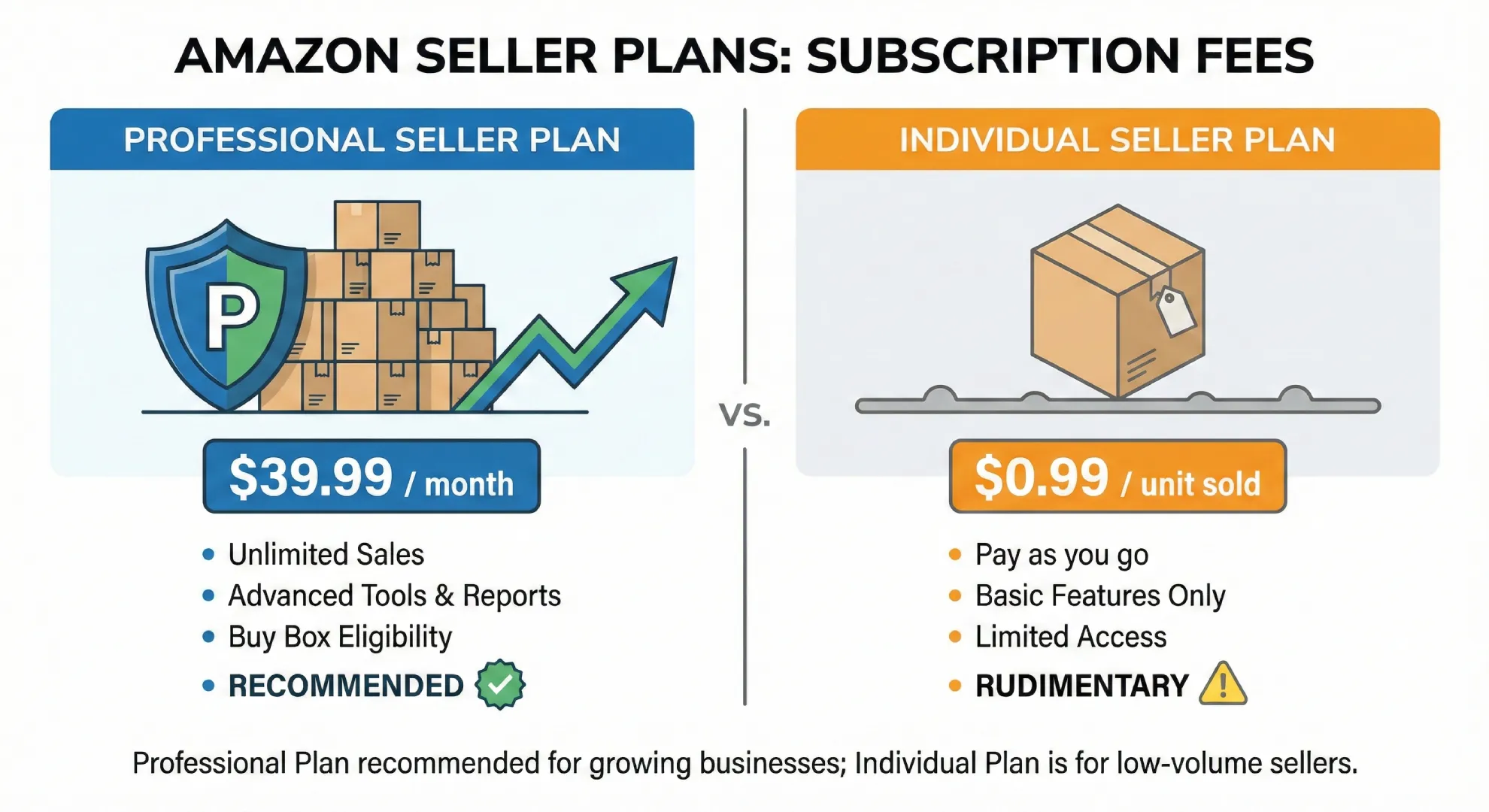
To stop the $39.99 monthly fee for a Professional Seller account for appearing on your credit card you need to downgrade your seller account. If you are out of stock, or simply take a break from selling you will have to continue paying this fee, unless you take action. Also, once your seller account balance hits zero, Amazon will aggressively bill your personal or business credit card on file to collect this debt.
To stop these continuous Repay charges, you do not need to permanently delete your seller account. In fact, closing your account completely is highly discouraged, as it acts almost like a lifetime ban that makes returning to the platform incredibly difficult. Instead, you should simply downgrade your account to the Individual Selling Plan. Under the Individual plan, you are not charged a flat monthly fee, you are only charged $0.99 when an item actually sells.
Step-by-Step Guide to Downgrading:
Once downgraded, your $39.99 monthly charges will cease immediately at the end of your current billing cycle, effectively putting a stop to the associated Seller Repay credit card charges.
For every sale, Amazon charges a percentage referral fee from the total sales price (excluding taxes). Referral fees can vary from 3% to 45% depending on product category. The screenshot below only shows a part of the table. You can find a comprehensive outline of referral fees for each category here.

For every unit sold, Amazon charges FBA fees that depend on product type, size tier of your product and shipping weight. Like referral fees, these fees are highly specific to those three dimensions. Once again, the screenshot below only provides a snapshot of the full table. You can find a detailed outline of Amazon fulfillment fees here.

Between the 7th and 15th of the month, Amazon charges storage fees based on the type of product, the month, and the size tier of your product. These fees are more expensive in the latter part of the year from October to December, and for dangerous goods products.

Long term storage fees are charged for inventory that’s been sitting in an Amazon Fulfillment Center for over 365 days. These are charged monthly between the 18th and 22nd of each month. Long term storage fees can be staggeringly expensive because they are charged per unit stored! Further details on these fees can be found here.

While most sellers are hyper-aware of FBA storage fees, a silent profit-killer that often triggers an Amazon Seller Repay charge is the High-Volume Listing Fee. If your catalog is bloated with thousands of “dead” listings that aren’t actively selling, Amazon will penalize you.
To cover the systemic costs of cataloging massive amounts of data, Amazon charges a monthly fee of $0.005 per eligible ASIN. This fee is applied to non-media ASINs that were created more than 12 months ago, have an active offer, but have not recorded a single sale in the past year. While half a cent sounds trivial, dropshippers or wholesale sellers with massive, unoptimized catalogs can suddenly find themselves hit with hundreds of dollars in fees. If your sales balance cannot cover this catalog maintenance fee, it will instantly convert into a Seller Repay charge on your credit card.
The Solution: Conduct a quarterly catalog audit. Comb through your Seller Central inventory and permanently close or delete old, inactive listings that have not generated revenue in the last 365 days. Keeping your catalog lean not only prevents High-Volume Listing Fees but also improves your overall Seller Central performance metrics.
Do you have inventory that is simply not selling, and you’d like to discard it? Well, that also costs a fee, which is called the FBA disposal order fee. These fees are charged per unit disposed, and the charge depends on the shipping weight per unit. Disposing units from your Amazon FBA store can come out to be very costly.

You can find a more detailed outline of FBA disposal fees here.
Returns processing fees are charged whenever a customer returns your product. First, Amazon will assess the returned item, and then after that fees are charged per unit returned based on the size tier of your product. This is why it’s important to ensure the quality of your products before selling them on Amazon.

A more detailed explanation of these fees including an example is provided here.
Amazon charges a fee every time you issue a refund to a dissatisfied customer. Not only do you lose money equivalent to the original sales price, you also get charged a little extra for issuing a refund. This, and the Returns Processing Fee mentioned earlier are some of the “mitigating” measures Amazon takes to ensure high quality products from Amazon Sellers.
Refund administration fees are charged per unit returned, and depends if you’re refunding multiple quantities of the same item, or multiple different items from the same order. A detailed overview can be found here.
Amazon has a lot of other hidden fees that are highly product-specific. For example, the “Special handling fee” which only applies to flat-screen TVs that are 42 inches or larger, and the charge is $40 per unit fulfilled! Similarly, a “Closing fee” gets applied to products sold in the categories of – Books, DVD, Music, Software & Computer/Video Games, Video Game Consoles, and Video Game Accessories.
There is also the “Rental book service fee” and the “Lithium batteries fee” and even a “High-volume listing fee!” Specific details for all of these can be found on the Amazon Help page – Selling on Amazon fees guide.
As you can see Amazon has an absolute myriad of fees when you really take a closer look at their guidelines. Amazon is very prompt in collecting these charges, and will almost always do it exactly on time. Due to all these little hidden fees, sometimes Amazon Sellers don’t realise how easily they start stacking up. Amazon keeps withdrawing from your Account Funds, and at some point, you’re going to hit zero.

The unfortunate reality is that even once you hit zero funds in your Amazon Account, you will continue to be charged in a timely basis. These is what an “Amazon Seller Repay Charge” or a “Seller Repayment” charge is. Basically, if you weren’t able to settle your charges due to insufficient funds in your account, this warning will appear in your Payments section.
The warning means that Amazon will initiate the same charge again at the end of every billing cycle, until it is settled. Without any funds in your account, the repay charges are then charged to your credit card, and are labelled “Amazon Repay.” Have you seen it before and been scratching your head at what it could possibly be? Well now you know!
So how do you avoid these scary Amazon Seller Repay charges? Well, it’s simple. Keep your eyes peeled, and learn how to manage your cash flow. There are no magic tips that can help you avoid these fees, and no secret code to crack. To avoid Amazon Seller Repay charges you need to do some good old-fashioned business management.
Start off by checking your Payment Reports on a frequent basis, we recommend as frequent as once a week. It’s not hard! Take an hour out of your day to keep abreast of any surprise charges.

You can find your Payment reports in Seller Central under Reports->Fulfillment->Payments. There’s four reports to look through- Fee Preview, Inventory Storage Overage Fees, Monthly Storage Fees, and Long-Term Storage Fee Charges. There is also a Reimbursements report, but that is not a fee but actually Amazon reimbursing you for any of your inventory that was lost or damaged in their warehouses.
After you’ve checked out and ideally consolidated the information from this report, we recommend you to make an Amazon FBA Cash Flow Forecast. Making a cash flow forecast is simpler than you think, and if you click the link you can find our step-by-step guide to doing so!
Most often, the costs Amazon Sellers struggle most to cover are Amazon PPC costs. Running ads on a competitive marketplace like Amazon, where CPCs are increasing day by day, is incredibly expensive. High ACoS can bleed you dry, which is why we highly recommend using Amazon PPC Automation Software to bring that ACoS down and save you those precious dollars.
Amazon’s automated billing system is highly sophisticated, but it is not flawless. There are instances where sellers are hit with an Amazon Seller Repay charge due to a system glitch, an incorrect FBA fulfillment fee calculation, or an unjust customer refund.
If you notice a Repay charge on your bank statement that does not align with your Payment Reports, you have the right to dispute it. Open a case with Amazon Seller Support under the “Payments” category. Provide the exact date, the transaction amount from your credit card statement, and a screenshot of your Seller Central statement view. Ask them to trace the origin of the debt. If Amazon discovers that you were incorrectly charged for an FBA dimensional weight error or a mishandled return, they will issue a reimbursement to your account balance.
Bookkeeping Implications: When reconciling your books in software like QuickBooks or Xero, an “Amazon Seller Repay” charge should be categorized as an operating expense or “Merchant Fee.” Because this charge is essentially Amazon pulling money from your bank to cover existing platform fees, it is critical that your bookkeeper does not double-count the expense. Ensure that the Repay charge is matched against the negative balance in your Amazon clearing account to maintain accurate profit and loss (P&L) statements.
Like every business, even for Amazon FBA, it all comes down to being well-informed and managing your cash flow. Amazon paints a very lucrative picture for Amazon FBA on the surface, and they’re not lying! Amazon FBA is an incredibly convenient method of eCommerce in 2021, but not every single piece of information can be displayed outright.
Being aware of the various fees require deep research into Amazon fees that every Seller needs to do. Thankfully, we’ve done it for you! We hope you found this article helpful, and wish you the best in your Amazon business!
We are SellerMetrics, our Amazon PPC Software helps Amazon sellers, brands, KDP Authors and agencies navigate Amazon Advertising PPC via bid automation, bulk manual bid changes, and analytics.
An Amazon Seller Repay charge occurs when your Amazon Seller Central account balance falls below zero. Because you do not have enough funds from your sales to cover your Amazon fees (such as storage fees, FBA fees, or monthly subscription fees), Amazon charges the credit card you have on file to recover the owed amount
Amazon always attempts to deduct seller fees directly from your account’s sales balance first. If your sales are low, or if you have recently issued multiple refunds that pushed your balance into the negative, Amazon has no choice but to bill your backup payment method (your credit card) to settle the debt.
There is no fixed amount for a Seller Repay charge. The charge will be exactly equal to the negative balance in your Seller Central account. For example, if you owe $39.99 for your monthly Professional Seller subscription and have $0 in sales, the Repay charge will be exactly $39.99.
The most effective way to stop Repay charges if you are not actively selling is to downgrade your account from the Professional Plan ($39.99/month) to the Individual Plan (no monthly fee). You should also remove unsellable inventory from FBA warehouses to prevent recurring storage fees.
Yes. If your Amazon account has a negative balance and the credit card on file declines the Seller Repay charge (due to expiration or insufficient credit), Amazon will temporarily suspend your selling privileges until a valid charge method is updated and the debt is paid.
To downgrade, log into Seller Central, go to “Settings,” click on “Account Info,” and look for the “Your Services” section. Click “Manage,” and then click the “Downgrade” button next to your Professional selling plan.
Amazon generally does not refund the $39.99 Professional Seller fee if you simply forgot to downgrade. However, if you have not used any of your professional tools and have genuinely not made a single sale for months, you can open a case with Seller Support to politely request a one-time goodwill refund.
You can find out exactly what fees triggered the charge by navigating to your Seller Central dashboard. Go to the “Reports” tab, click on “Payments,” and view your “Statement View” or “Transaction View.” This will show an itemized list of all fees that led to the negative balance.
Deleting or permanently closing your Amazon Seller account is highly discouraged unless you are entirely sure you will never sell on Amazon again. Once closed, Amazon treats it as a lifetime ban, making it incredibly difficult to open a new account in the future. Downgrading to an Individual plan is a much safer alternative.
To update your credit card, log into Seller Central, go to “Settings,” and select “Account Info.” Under “Payment Information,” click on “Charge Methods.” From there, you can add a new credit card or assign an existing card to cover any future Seller Repay charges.

9 March 2026
TweetLinkedInShareEmailPrint 14 min read By Rick Wong Updated Mar 09, 2026 TL;DR What is Private Label ...

15 February 2026
TweetLinkedInShareEmailPrint 8 min read By Rick Wong Updated Feb 16, 2026 TL;DR Is investing in custom ...

1 January 2026
TweetLinkedInShareEmailPrint Amazon posts are a popular way to make your brand more discoverable on Amazon. I...