5 April 2026
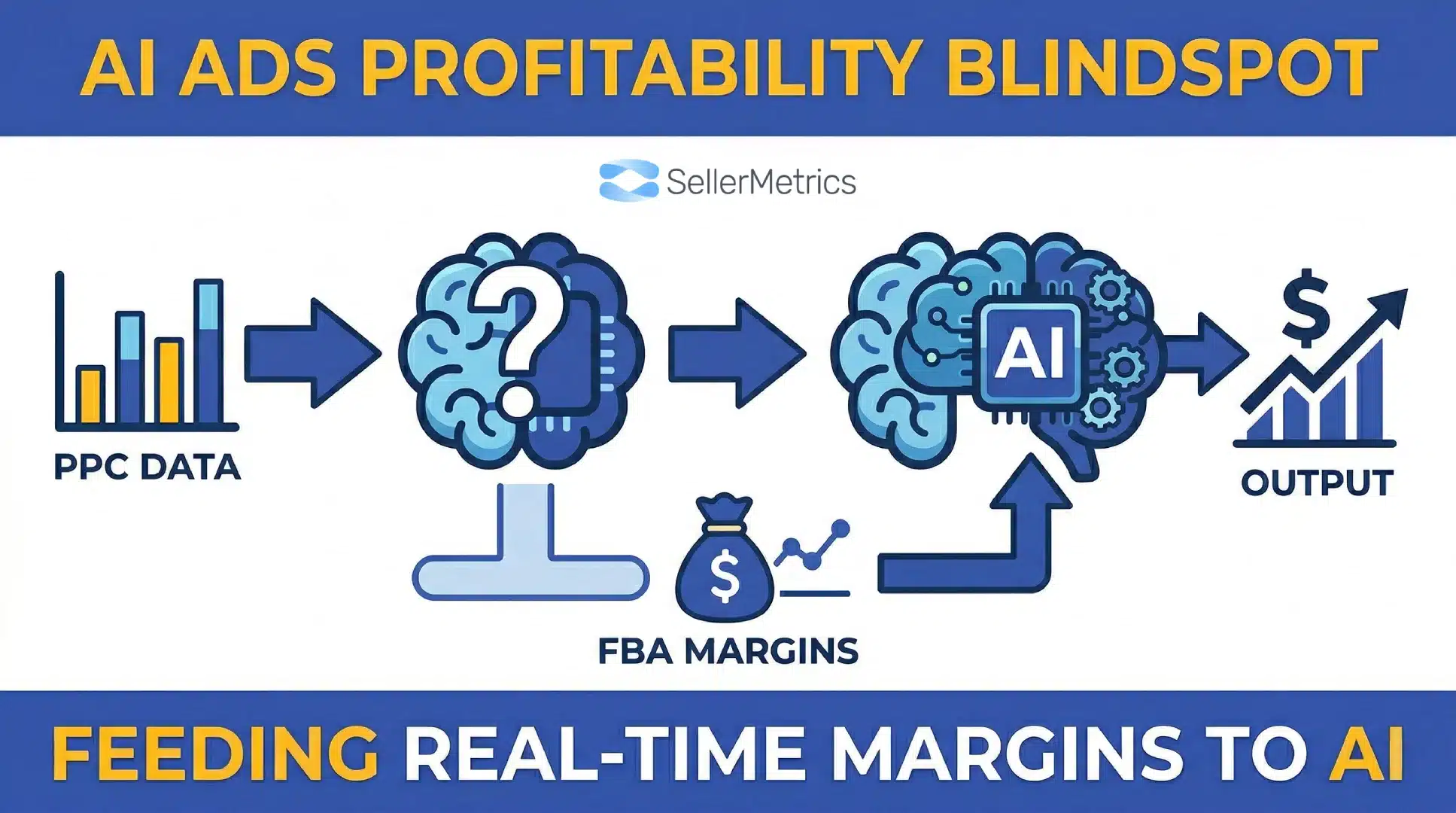
The MCP Blindspot: How to Feed Real-Time FBA Margins into Claude Code
TweetLinkedInShareEmailPrint 20 min read By Rick Wong Updated Apr 05, 2026 TL;DR Why is my AI ad tool d...

 1 January 2026
If you have been selling on Amazon for more than a few years, you know the feeling of “platform fatigue.” Every few months, Amazon announces a new dashboard, a new metric, or a new fee structure that requires you to relearn how to protect your margins. Most of these updates are incremental, a fresh coat of paint on a rusting hull.
But occasionally, perhaps once every three or four years, the tectonic plates of the Amazon ecosystem shift violently. The introduction of PPC was one. The launch of Brand Registry was another.
We are currently standing at the precipice of the third major shift: The merger of Amazon’s highest-volume ad unit with its highest-engagement creative format.
For years, “Sponsored Products” and “Video” were two separate islands. Sponsored Products (SP) were the workhorses, static images that blended into the search results, driving 70% to 80% of all ad revenue. They were boring, efficient, and ubiquitous. Video, on the other hand, was reserved for “Sponsored Brands”, the flashy banners at the top of the page, designed for awareness rather than hard-hitting conversion.
That wall has just crumbled.
Amazon has quietly released Sponsored Product Video (SPV). This is not just a new feature; it is a fundamental reimagining of the Search Engine Results Page (SERP). It means that the standard grid of products, the “aisle” where customers make their final decision, is no longer a static library of images. It is becoming a moving, breathing feed of content.
For US-based sellers facing the crushing weight of 2026 fee hikes and rising CPCs, this is the lifeline you have been waiting for. It is an unfair advantage, but only if you move now.
In this guide, we are going to tear apart this new feature. We will look at how to find it (because Amazon has hidden it well), how it differs from everything you’ve done before, and the specific creative psychology you need to deploy to stop the scroll and win the click.
Article of Contents
To understand why this update is critical, we have to look at the macro environment. Why is Amazon doing this?
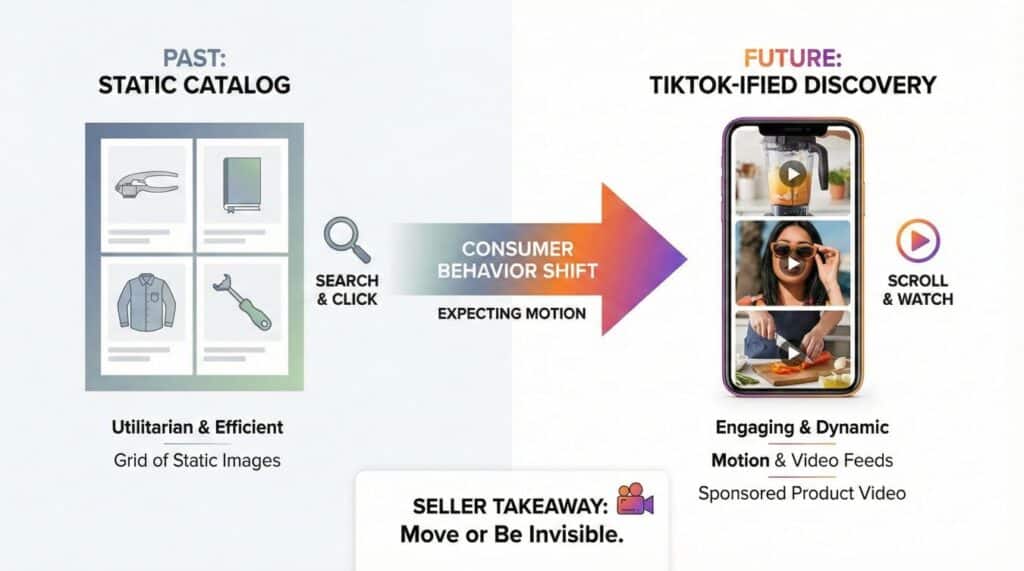
For the last decade, Amazon’s search results were modeled after a digital catalog. You searched for “garlic press,” and you got a grid of static images. It was utilitarian. It was efficient.
But consumer behavior has mutated. Platforms like TikTok, Instagram Reels, and YouTube Shorts have rewired the human brain. The modern consumer, your customer, doesn’t just read to discover; they watch to discover. Static images are increasingly becoming invisible to a generation trained on motion. People now expect motion when they browse online. A shopper might watch how a blender works before reading the specs.
Amazon knows this. They know that if their platform remains a static catalog while TikTok Shop becomes a dynamic discovery engine, they lose.
Sponsored Product Video is Amazon’s defensive strike. By allowing video directly inside the main search grid (not just at the top), they are transforming the shopping experience from “Search and Click” to “Scroll and Watch.”
For you, the seller, this means the days of relying solely on a white-background main image are numbered. If your competitor’s listing is moving and yours is standing still, you are effectively invisible.
Let’s get technical. Confusion is rampant right now because Amazon has multiple video ad types.
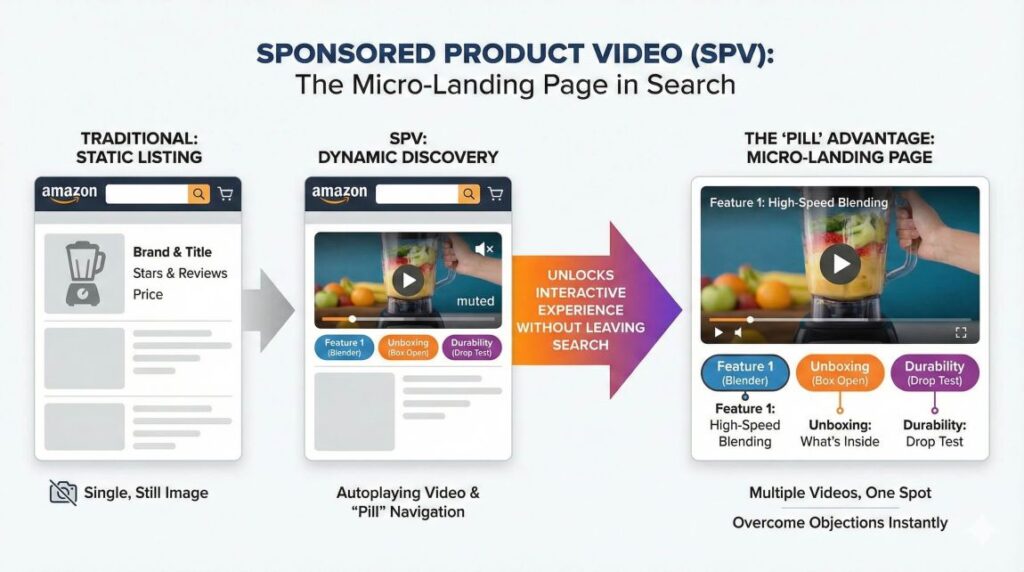
Historically, you had Sponsored Brands Video (SBV). These are the wide, horizontal videos that appear at the very top of the search results or periodically in the middle of the page. They take up a lot of real estate and usually link to a Storefront or a specific product page.
Sponsored Product Video (SPV) is different.
These ads appear inside the organic search grid. To a shopper, they look almost identical to a standard organic listing, except for one crucial difference: the main image is replaced by a video that autoplays (muted) when 50% of the pixels are on screen. Think of SPV as a product listing that moves instead of sits still.
The Key Specs You Need to Know:
This is massive. Amazon is essentially allowing you to build a micro-landing page right in the search results. You can overcome objections, show the size, demonstrate the material, and prove the durability, before the customer even clicks through to your listing.

If you log into Seller Central right now and try to create a new campaign, you probably won’t see this feature. You might scream, “I don’t have it!”
Calm down. You probably do have it, but Amazon has buried it.
Because this is a Beta feature (as of late 2025), it is not integrated into the main “Create Campaign” workflow yet. If you click “Create Sponsored Product Campaign,” you will see the standard options: Auto vs. Manual, Keyword vs. Product Targeting. No mention of video.
Here is the “Backdoor” Method to access it:
Note: If you still don’t see it there, try creating a brand new dummy campaign, save it, and then go back into the Ad Group level. If it’s still absent, your account may be in the rare 10% that haven’t been whitelisted yet, but this is changing daily.
Once you click “Add Video,” the interface allows you to upload MP4 or MOV files directly to that Ad Group. This means the video will be associated with the specific SKUs and Keywords in that group.
This is the part where most sellers will lose money.
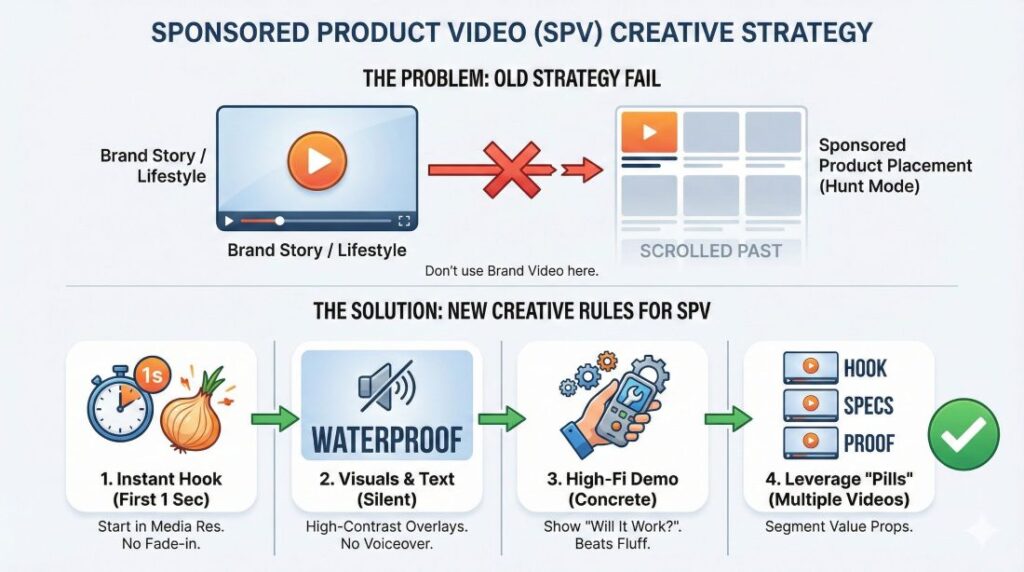
The natural instinct is to take the video you are using for Sponsored Brands, that nice, polished 45-second commercial with the lifestyle shots and the drone footage, and just upload it to Sponsored Products.
Do not do this.
The context is completely different.
Sponsored Brands is a “Top of Funnel” placement. Shoppers seeing those ads are often just starting their search. They are open to “Brand Story.”
Sponsored Products is a “Bottom of Funnel” placement. Shoppers are in the “aisle.” They are comparing prices, star ratings, and features. They are in “Hunt Mode,” not “Browse Mode.”
If your Sponsored Product Video starts with 5 seconds of a slow fade-in of your logo, or a happy couple laughing on a beach, the shopper has already scrolled past you. You are dead. Your goal is to make the shopper stop scrolling for one second.
The New Creative Rules for SPV:
People decide in under a second if they want to keep watching. In the search grid, thumb-scroll speed is blindingly fast. You do not have 3 seconds to hook them. You have frames.
85% to 90% of these views will happen on mobile devices with the sound off. The video must communicate value purely visually.
Our early data (and data from top spenders like Sophie Society) suggests that in the Sponsored Product placement, High-Fidelity Demos outperform Lifestyle Fluff by a factor of 3:1. Shoppers in the grid want to know: “What is it?” and “Will it work?” Lifestyle videos are vague. A demo is concrete. Amazon’s internal beta data supports this, showing an 8x increase in CTR for engaged viewers who watched product feature demos.
Since you can upload multiple videos, use them to segment your value proposition.

Why is this opportunity so urgent? It comes down to how the Amazon algorithm determines who wins the ad spot.
Amazon’s ad auction is not a simple “highest bidder wins” system. It is a function of Bid × Relevance. Relevance is largely determined by CTR (Click-Through Rate) and CVR (Conversion Rate).
If your ad gets clicked more often than your competitor’s, Amazon assigns you a higher “Quality Score.” This means you can actually bid less than your competitor and still win the top spot, because Amazon makes more money from you (since your ad actually generates clicks).
Here is the math of the Video Advantage:
If moving to video doubles your CTR, you are effectively feeding the algorithm rocket fuel. You will win more auctions. You will pay lower effective CPCs over time. More clicks tell Amazon that your ad is useful, so you win more placements for less money. And, perhaps most importantly, the increased traffic velocity will bleed over into your Organic Rank. Even a small jump in CTR can move you higher in the results.
This is why the “First Mover Advantage” is real. Right now, the SERP is mostly static. If you are the only moving element on the page, your CTR will be artificially high simply because of the “Shiny Object Syndrome.” In two years, when everyone has video, that advantage will normalize. But right now? It is an arbitrage opportunity.
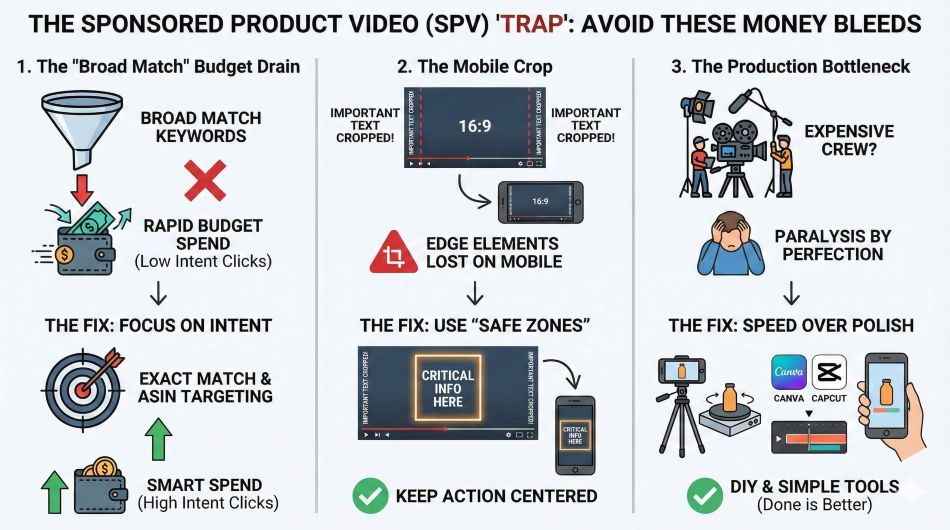
I would be remiss if I didn’t warn you about the dangers. Sponsored Product Video is a power tool, and like any power tool, you can cut your thumb off if you aren’t careful.
1. The “Broad Match” Budget Drain. Broad Match plus video can drain your budget in hours. Because video ads have a higher CTR, they can spend the budget very fast. If you apply video creatives to a campaign running generic Broad Match keywords (e.g., “gift for dad”), you will generate thousands of clicks from curious window shoppers who have no intent to buy.
2. The Mobile Crop. You might edit a beautiful 16:9 (widescreen) video. But on the Amazon mobile app, the search grid often crops or resizes assets. If your text overlay is on the far edges of the video, it might get chopped off.
3. The Production Bottleneck. “I don’t have 5 videos for every SKU!” This paralysis stops 90% of sellers. Do not let perfect be the enemy of profitable.

Ready to launch? Don’t just throw spaghetti at the wall. Follow this protocol for your first test to help you understand what style works for your audience.
Step 1: Identify Your “Hero” ASIN. Pick your best-selling product. You want a product with a high conversion rate to ensure that the extra traffic you drive actually converts.
Step 2: Create a Dedicated “Video Test” Campaign. Do not just add video to your existing legacy campaigns yet. Create a new Manual Sponsored Product campaign.
Step 3: The Creative Split Test. Create two Ad Groups within this campaign.
Step 4: The 14-Day Rule. Let it run for 14 days. Do not touch it. Video metrics take longer to attribute than standard clicks because the customer journey is often more complex (they watch, they think, they come back).
Step 5: Analyze “View-Through” Metrics. Look at the new columns in your reporting. Amazon is rolling out metrics like “5-second view rate.” If your 5-second view rate is low, your hook is boring. Re-edit the first second.
The introduction of Sponsored Product Video is not just a “nice to have.” It is the future standard of the platform.
Think back to 2016. The sellers who ignored Sponsored Products because “organic reach was free” are now out of business. Think back to 2019. The sellers who ignored Sponsored Brands Video because “it was too hard to make videos” missed out on the lowest CPCs in Amazon history.
We are in that moment again.
Right now, in Q4 2025 and heading into 2026, the majority of your competitors are lazy. They are intimidated by video. They are waiting to see if it catches on. They are sticking to their static images because it is safe.
This is your window. By the time they realize that the entire search grid has turned into a video feed, you will have already built the data history, the quality score, and the market share to dominate.
Go find the hidden tab. Shoot the video. Launch the campaign. If you act early, you gain an advantage that late adopters cannot match.
The revolution is silent, but the profits will be loud.
As of late 2025, it is in Open Beta. Most Brand Registered sellers in the US market have access, but it is rolling out in waves. If you don’t see it, check back weekly or open a case with Seller Support to request beta access.
Yes. Like Sponsored Brands, Amazon generally restricts advanced creative formats to sellers enrolled in Amazon Brand Registry. This is another reason to get your trademark finalized immediately.
Technically, no. It uses the same CPC (Cost Per Click) bidding model. However, because video ads have higher click-through rates, you may spend your daily budget faster. You need to monitor your spend carefully in the first few days.
Yes. Amazon has released an “AI Video Generator” in the Creative Studio that can turn static images into simple video assets. While these are okay for a start, custom-shot footage usually performs better because it looks more authentic.
They autoplay muted. Sound only plays if the customer taps the mute button. This is why on-screen text overlays are absolutely critical for success.
Amazon accepts both 16:9 (Horizontal) and 9:16 (Vertical). However, given that over 60% of traffic is mobile, we highly recommend prioritizing Vertical (9:16) or Square (1:1) formats to maximize screen real estate on phone screens.
Yes, you can use the same video asset across different ad groups and different SKUs, provided the video is relevant to all of them. However, specific videos for specific variations (e.g., showing the Blue shirt for the Blue ASIN) will convert better.
You can upload up to five videos per product. Amazon will algorithmically decide which one to show as the “main” video based on user history, but users can toggle through all of them using the new interface pills.
Indirectly, yes. Sales driven by Sponsored Products (including video) contribute to your sales velocity, which is the primary driver of organic ranking. Furthermore, if the video ad drives a higher conversion rate than a static ad, it signals to Amazon that your product is highly relevant.
Amazon has strict moderation policies. Common rejection reasons include: referring to Amazon (e.g., “Amazon’s Choice”), making unsubstantiated claims (“#1 Best Seller”), or poor video quality. Review the “Creative Acceptance Policies” in Seller Central before uploading to avoid delays.
Currently, the beta is primarily focused on the North American (US) market. However, Amazon typically rolls out these features to the UK and Germany (EU5) within 3-6 months of the US launch.
Yes, but be careful with the “safe zones.” TikTok has icons on the right and bottom. Ensure your video is “clean” (no TikTok watermark, no UI elements) before uploading to Amazon, or it will look unprofessional and may be rejected.
5 April 2026
TweetLinkedInShareEmailPrint 20 min read By Rick Wong Updated Apr 05, 2026 TL;DR Why is my AI ad tool d...
4 April 2026
TweetLinkedInShareEmailPrint 8 min read By Rick Wong Updated Mar 30, 2026 TL;DR What is the difference ...
31 March 2026
TweetLinkedInShareEmailPrint 8 min read By Rick Wong Updated Mar 30, 2026 TL;DR What exactly is the Uni...